Manager Mode: How Helix Keeps AI Agents on Track for Real Engineering Tasks

Most AI agents fail not because they lack capability — they fail because they drift.
They start with your intent, pick up momentum, and end up doing twelve things you never asked for. Or they declare success before anything actually ships.
Manager Mode in Helix is the architectural answer to that problem. It is not a longer prompt or a cleverer system message. It is a real multi-agent orchestration layer implemented at the system level — one agent guards intent, one agent runs the work, and several SubAgents go deep in parallel, with strict separation of duties and mutual constraint.
1. The drift problem nobody talks about
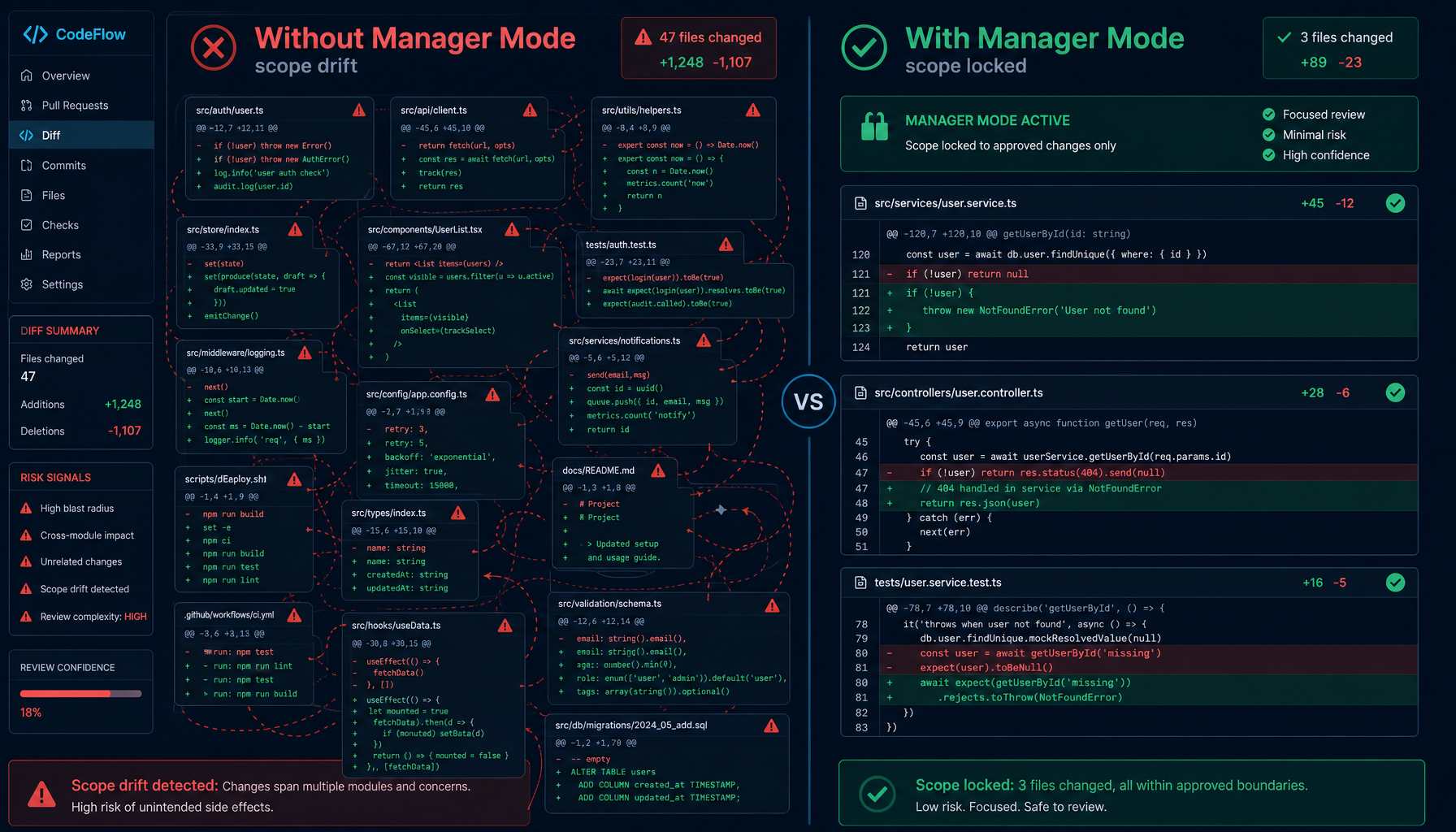
You ask an AI to "refactor the authentication module." Three minutes later it has:
- refactored authentication ✓
- "improved" a bunch of unrelated utilities
- changed the error handling convention across five files
- added a new dependency it thought was "clearly better"
- written a summary explaining why all of this was necessary
The core task might be done. But now you have a diff that touches forty files, your code review is a nightmare, and you have no idea what actually changed versus what the agent decided to change on its own.
This is scope drift. It happens because a single-agent system has no separation between understanding what was asked and executing what it thinks is needed. Those two things collapse into one thread with no guardrails.
There is a dual problem that is just as common — premature completion. The agent writes a tidy summary: "I've finished refactoring the authentication module with changes X, Y, Z." You go check the repository and find no commit in git log, no merge to main, no test run at all.
Drift and premature completion look like two different bugs. The root cause is the same: no independent role is responsible for "what did the user originally ask?" and "is this task actually done?".
Manager Mode solves this with a three-layer architecture where intent preservation, task execution, and parallel subtask handling are handled by separate, specialized agents.
2. What is Manager Mode
Manager Mode is Helix's orchestration layer for complex, multi-step engineering work.
When you enable it, your session gains a Manager Agent that sits between you and execution. The Manager does not write code. It does not run tools. Its job is to:
- Receive your request and forward it to the Execution Agent — faithfully, without modification
- Verify that what actually got done matches what you actually asked for
- Enforce a strict definition of "done" that includes commit, merge, verification, and clean workspace
- Refuse to call anything complete until all five criteria are met — with evidence
The Execution Agent handles the real work, breaking tasks into subtasks and running them in parallel using SubAgents. But it always operates under the Manager's scope constraints.
Think of it as having a technical project manager and a senior engineer on every task, where the project manager's only job is to make sure the engineer doesn't go off-script. That role split has worked in real engineering teams for decades; Helix transplants it verbatim into the AI agent system.
3. Three-layer architecture
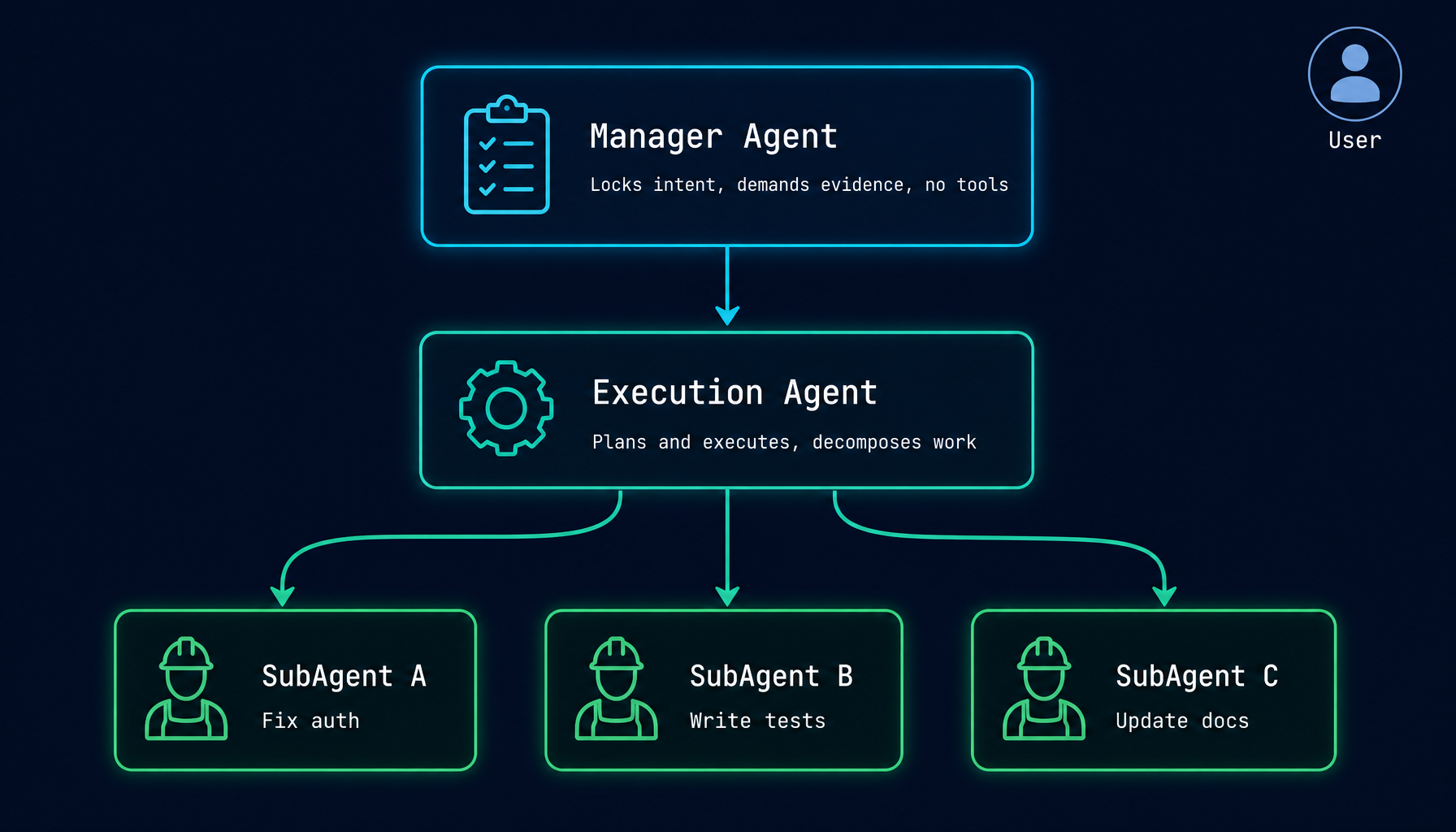
Here is how the three layers interact:
- You submit a task via chat or UI.
- Manager Agent locks the original intent as a baseline, forwards the task verbatim to the Execution Agent, and checks completion across six dimensions: implementation + commit + merge + verify + clean workspace + no scope creep. It demands evidence, not summaries.
- Execution Agent is the layer that actually does the work: plans and implements, decomposes work, manages all tool calls (file edits, shell, LSP, MCP), and reports back with verifiable evidence.
- SubAgent A / B / C are parallel execution units dispatched by the Execution Agent via
run_subagent. Each one focuses on a single independent task and all of them share the Execution Agent's git worktree.
SubAgents share the Execution Agent's git worktree — they operate within the same working copy of the repository. The Execution Agent coordinates all file changes and, when the task is complete, commits and merges the result back to the main branch.
SubAgents cannot spawn their own SubAgents. This is intentional. Unbounded recursion in agent systems leads to unpredictable resource usage and hard-to-trace execution paths. The three-layer limit is enforced at the system level, not as a polite reminder in a prompt.
The key design stance: no single agent simultaneously owns "defining the goal" and "executing the goal." The PM does not write code, and the engineer does not change the requirements. Real engineering teams call this "separation of duties." In AI agents, we call it Manager Mode.
4. Core mechanisms
4.1 Scope locking
When the Manager Agent receives your request, it records your original intent as a baseline. Every subsequent action by the Execution Agent is evaluated against this baseline.
The rules are strict:
- "Improvements" that weren't requested → out of scope
- Refactors that touch files not related to the task → out of scope
- New dependencies added because the agent thought they were better → out of scope
The Manager maintains a mental model of what belongs to this task and what does not. If the Execution Agent tries to expand the scope — even with good justification — the Manager flags it and either rejects it or surfaces it to you as an explicit proposal.
An often-overlooked detail: the Manager has no file tools and no shell access. It can only observe and direct. This "invisible hand" design is precisely what makes scope enforcement credible — the enforcer cannot be tempted to "just fix one more thing."
Why can't a prompt solve this? This is the first question many people ask about Manager Mode — if the Manager only "guards intent," why not just write "don't go out of scope" in the system prompt?
The answer: prompts have no enforcement. If the same agent both interprets what you want and decides what to do, it will eventually override "the user didn't ask for this" with "I think this change is better." Only when the enforcer and the executor are two separate instances, and the enforcer literally has no ability to act, does the constraint actually hold. That is an architectural decision, not something prompt engineering can patch over.
4.2 The five completion criteria
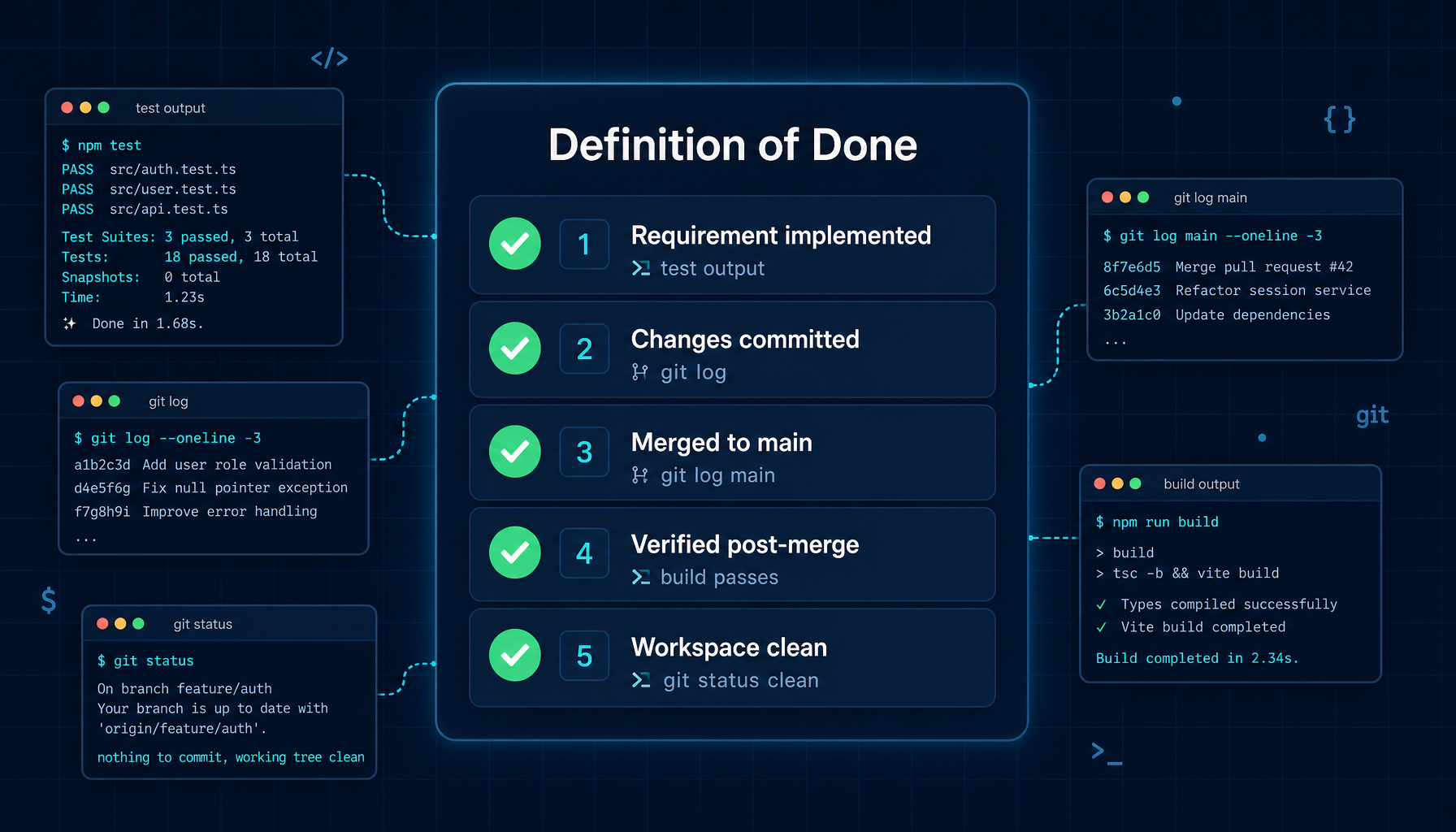
The Manager will not report a task as complete until all five of these are true — with verifiable evidence:
| # | Criterion | What counts as evidence |
|---|---|---|
| 1 | Original requirement implemented correctly | Test output, output of relevant commands |
| 2 | Changes committed | git log showing the commit |
| 3 | Merged to main branch | git log main showing the merge |
| 4 | Main branch verified post-merge | Build/test run on main after merge |
| 5 | Workspace clean, no scope violations | git status clean, diff shows only expected files |
"The agent said it's done" does not count. The Manager requires actual command output, tool results, or test runs. This eliminates the most common — and most insidious — failure mode: an agent that summarizes success without actually delivering it.
This principle will feel "overly strict" at times, until you first run into a situation where the Execution Agent reports "done" and the Manager pulls up git status to find uncommitted changes still sitting in the worktree, and sends the task back. That is the moment you realize what the word "done" really means.
4.3 Parallel SubAgent execution
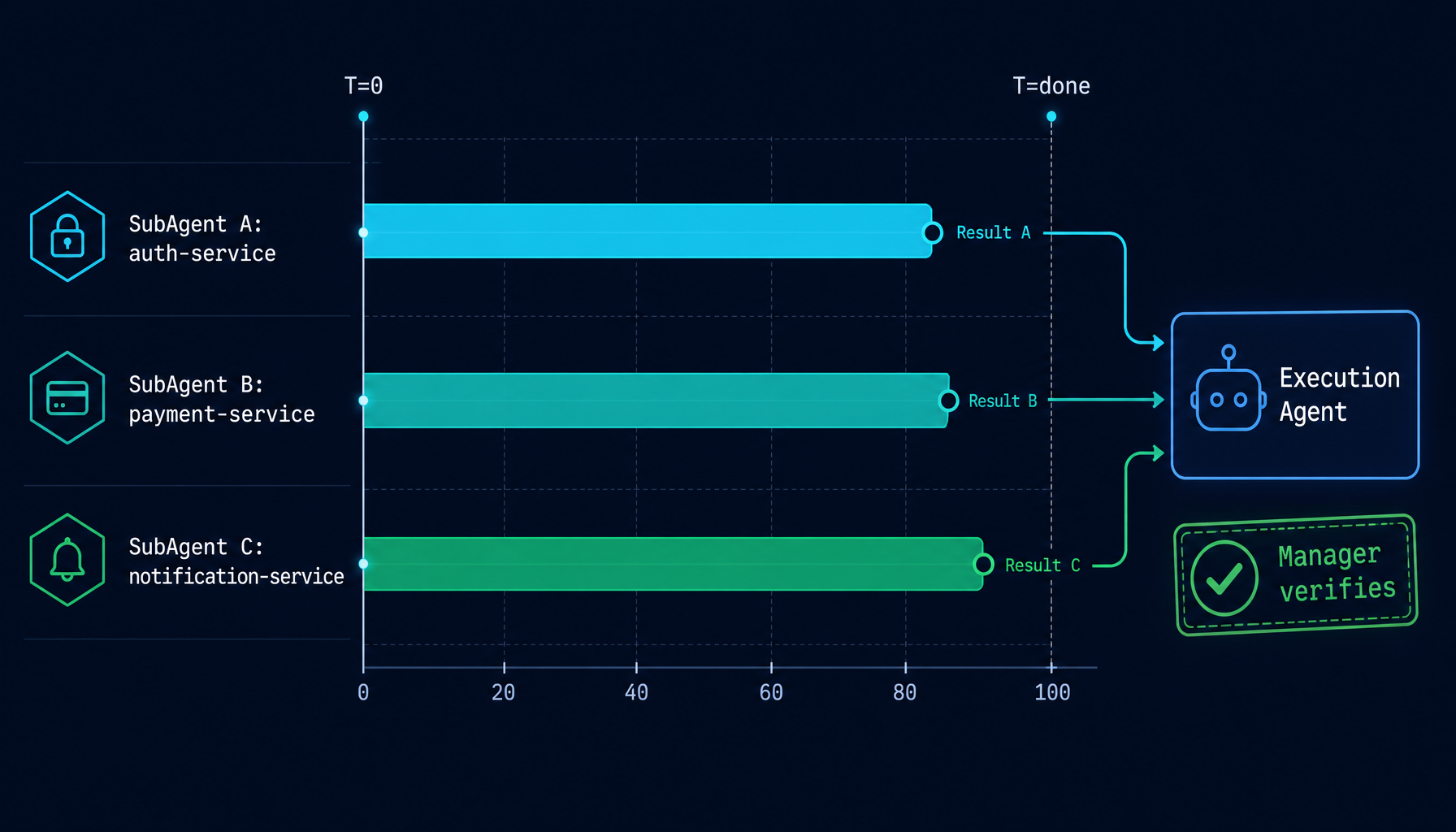
When the Execution Agent identifies independent subtasks, it dispatches them as SubAgents that run concurrently:
Execution Agent calls run_subagent("Fix auth module",  model="claude-sonnet-4-5")
Execution Agent calls run_subagent("Write tests",      model="claude-sonnet-4-5")
Execution Agent calls run_subagent("Update docs",      model="claude-haiku-4-5")
          ↓                              ↓                      ↓
    [runs in parallel]            [runs in parallel]     [runs in parallel]
          ↓                              ↓                      ↓
    SubAgent returns result       SubAgent returns result  SubAgent returns result
          ↓                              ↓                      ↓
                    Execution Agent collects all results
                              ↓
                    Runs verification, hands evidence to Manager
SubAgents share the Execution Agent's worktree and coordinate their file changes through the Execution Agent, which sequences writes and manages the final merge. This avoids the race condition of concurrent SubAgents stepping on each other's writes.
Parallelism is not only a performance win. It fundamentally changes the waiting experience — the original "ask, wait, ask again, wait again" serial rhythm is replaced by "set the full goal once, watch multiple workstreams converge."
And because the Manager Agent is guarding scope upstream, the "loss of control" risk that usually comes with parallelism is held in check. No matter how fast three SubAgents run, the Execution Agent still merges in order, and the Manager still verifies the whole delivery against the same standard. Faster, without losing edges.
4.4 Context management under long tasks
Long-running tasks accumulate a lot of history. Helix uses two mechanisms to keep sessions healthy:
KV Caching: Large tool outputs (file reads, command results, search results) are cached so they don't need to be re-sent with every LLM request. The cache is transparent — you don't configure it, it just works.
Auto-compression: When conversation history grows beyond a threshold, Helix compresses older messages into a concise summary and moves the "active window" forward. The agent retains full context of what happened without paying the token cost of the full history.
Both mechanisms are invisible during normal use. They're what makes a 50-turn task feel as responsive as a 5-turn one.
4.5 Session-level identity isolation
When you run multiple Manager sessions in parallel — one refactoring auth, one running a data migration, one building a new feature — Helix guarantees:
- Each session has an independent Manager / Execution / SubAgent stack
- Sessions do not bleed into each other — task A's scope baseline does not pollute task B
- Switching workspaces also switches session state, model selection, and connection configs — you don't re-explain context
This isolation is a background mechanism. Users rarely notice it. But it is exactly what makes "leave Manager Mode running on multiple tasks and walk away" a safe thing to do.
5. How to use Manager Mode
5.1 Enabling it
On the workspace selector page, you will find a Manager entry alongside the Chat option. Click it to open a Manager session. The three-layer architecture is automatic — no extra configuration required.
5.2 Writing good task requests for Manager Mode
Manager Mode is most effective when your request is specific about scope boundaries. Compare:
Less effective:
Improve the login flow
More effective:
Refactor the login flow to use the new AuthService interface. Only touch files in
src/auth/andsrc/components/Login/. Don't change the API contracts.
The Manager uses your request as its scope baseline. The more precisely you describe what's in scope, the more precisely it can guard against drift.
You don't need to be exhaustive — the Manager can handle ambiguity. But explicit scope boundaries give it harder constraints to enforce.
A simple heuristic: if you would normally write a task spec or ticket before handing this work to another person, it's a Manager Mode task.
5.3 Handling scope expansion proposals
Sometimes the Execution Agent will identify something it thinks should be part of the task. The Manager will surface this to you as an explicit question rather than silently including it:
Execution Agent found an issue in the session middleware that may affect
the auth refactor. This was not in the original scope.

Expand scope to include middleware fix? [Yes / No / Defer]
Saying "No" or "Defer" keeps the current task clean. You can always start a new session for the follow-up work. This is Manager Mode's explicit boundary between focus and flexibility.
5.4 Monitoring progress
While a Manager session is running, you can see in real time:
- Which SubAgents are active and what they're working on
- Token usage per agent
- Tool calls in flight
- What changes are currently pending in the worktree
All of this is visible in the session's live event stream. If you step away and come back, you can scroll the stream to see which SubAgents the Execution Agent dispatched, their individual results, and the Manager's per-criterion completion checks.
6. Real-world scenarios
Scenario 1: Multi-module API migration
The task: Migrate three service modules from REST to gRPC.
Without Manager Mode: You start a session, the agent begins migrating auth service, notices the user service uses a similar pattern, starts touching that too, then realizes the test fixtures need updates, then decides to refactor the error types "since we're here anyway." Two hours later you have a diff across eleven modules and a broken build.
With Manager Mode:
You submit:
Migrate auth-service, payment-service, and notification-service from REST to gRPC. Use the existing proto definitions in
/proto/. Don't touch other services or shared utilities.
The Manager locks this scope. The Execution Agent dispatches three SubAgents — one per service — running in parallel:
SubAgent A: auth-service migration      [parallel]
SubAgent B: payment-service migration   [parallel]
SubAgent C: notification-service        [parallel]
Each SubAgent works independently. When all three complete, the Execution Agent runs the merge sequence and verifies the build. The Manager reviews the final diff, confirms it only touches the three specified services, then presents you with a commit hash, test results, and a clean git status.
Total scope: exactly what you asked for.
Scenario 2: Large codebase refactor with test coverage
The task: A legacy data model class (LegacyUserRecord) needs to be replaced with the new UserProfile type across a large codebase — 60+ files.
Without Manager Mode: A single-agent session will lose track of its own progress in long tasks. It might fix 40 files, think it's done, write a summary, and stop. Or it might fix 60 files but introduce subtle differences in how it handled edge cases across different parts of the codebase.
With Manager Mode:
The Execution Agent uses LSP tools to find all 63 references to LegacyUserRecord, groups them into logical clusters by module, and dispatches SubAgents for each cluster:
SubAgent A: core domain models (12 files)
SubAgent B: API layer (8 files)
SubAgent C: service layer (18 files)
SubAgent D: repository layer (14 files)
SubAgent E: test files (11 files)
Each cluster is internally consistent. When all SubAgents complete, the Execution Agent runs the full test suite. The Manager verifies:
- All 63 references migrated (via
grep -r LegacyUserRecordreturning empty) - Tests pass
- No unrelated files changed
If any SubAgent missed a reference or introduced a regression, the Manager identifies the gap and sends the Execution Agent back to fix specifically that issue — not restart everything. In long tasks this matters: one missing reference should never force a full redo.
Scenario 3: Parallel feature development with merge coordination
The task: Implement a new analytics dashboard that requires backend API endpoints, frontend components, and database migrations — all independent work streams.
The challenge: Three engineers would normally do this in parallel. With a single AI agent, it becomes a serial slog.
With Manager Mode:
You send:
Build the analytics dashboard feature. Backend: add
/api/analytics/summaryand/api/analytics/eventsendpoints insrc/api/. Frontend: createAnalyticsDashboardcomponent insrc/components/. Database: add migration foranalytics_eventstable. These are independent — parallelize them.
The Execution Agent dispatches three SubAgents simultaneously:
SubAgent A [backend]   → writes API endpoints, runs unit tests
SubAgent B [frontend]  → builds React component with mock data
SubAgent C [database]  → writes migration, tests locally
SubAgent A and SubAgent C finish first. SubAgent B finishes 40 seconds later. The Execution Agent then:
- Collects and applies all three SubAgents' results in sequence
- Runs integration tests that connect all three layers
- Fixes one minor import path conflict from the merge
- Verifies the full test suite passes
The Manager confirms: three independent workstreams, completed in roughly the time it would have taken to do one serially, with verified integration.
7. When to use Manager Mode
Manager Mode adds orchestration overhead. For quick, scoped tasks it's often more than you need. Here's a rough guide:
| Task type | Recommended mode |
|---|---|
| Quick question, explanation, code snippet | Standard chat |
| Single-file edit or small bug fix | Standard or Coder mode |
| Multi-file refactor within one module | Coder mode |
| Cross-module refactor, feature spanning multiple layers | Manager Mode |
| Large migration (many files, parallel workstreams) | Manager Mode |
| Long-running task where you need to walk away | Manager Mode |
| Task where scope drift has burned you before | Manager Mode |
The signal: if you'd normally write a task spec or ticket before handing it to another person, you probably want Manager Mode.
The reverse is also true: if you just want to ask "why is this code erroring?", the three-layer architecture is overkill — standard chat is enough. One mark of a good tool is knowing when not to use it.
8. What makes this work in practice
A few design decisions that make the system reliable rather than just theoretically sound:
The Manager never executes. It has no file tools, no shell access. It can only observe and direct. This separation is what makes scope enforcement credible — the enforcer can't be tempted to "just fix one more thing."
SubAgents are recursion-limited. SubAgents cannot spawn their own SubAgents. This is a hard system-level constraint, not a prompt instruction. It keeps execution depth predictable and prevents runaway branching.
Evidence is required, not requested. The Manager's completion check is not "did the agent say it's done?" It's "can I see the command output that proves it?" The prompting enforces that distinction explicitly, and the system makes it part of the completion judgment.
Worktree is managed by the Execution Agent. SubAgents share the Execution Agent's git worktree. The Execution Agent coordinates write sequencing across parallel subtasks, so changes from concurrent SubAgents are applied in a controlled order rather than colliding.
Retries are built in. Every LLM call uses exponential backoff retry (up to 3 attempts, 2s initial delay). Transient API failures don't break long tasks.
Sessions are isolated. Multiple Manager sessions don't bleed into each other — role baselines, scope memory, SubAgent state are all kept separate. That's what makes "run several tasks in parallel" a safe thing to do.
9. Get started
If you haven't enabled Manager Mode yet:
- Open Helix and create a new session
- Click the Manager entry on the workspace selector page
- Write your task with explicit scope boundaries
- Watch the live event stream as subtasks execute in parallel
The first time a task that would have drifted stays clean — or the first time you see three SubAgents completing a week's worth of parallel work in minutes — is when the model clicks.
To understand the bigger picture of how Helix treats agents as an engineering system, read Introducing Helix.
Manager Mode runs on top of Automatic Worktree — the Execution Agent never modifies your main branch directly; all changes happen in an isolated branch first.
If your Manager Mode task is doing environment-heavy work, HelixVM turns the execution boundary into a security boundary as well.
10. What's coming
We're continuing to improve Manager Mode:
- Richer evidence pages — visual breakdowns of what each SubAgent did, with diff summaries and test results inline
- Scope proposals UI — cleaner interface for reviewing and approving scope expansion requests
- Workflow templates — pre-built task templates for common patterns (migration, feature build, test coverage)
- Team visibility — let collaborators see live task execution status too, so "what is the agent doing right now?" becomes a team-level signal rather than a single user's view
Questions, edge cases where it broke, tasks where it surprised you in a good way — send them our way. Manager Mode gets better from real workloads.