HelixVM: Stop Letting AI Agents Run Naked on Your Real Machine

What's really blocking AI agent adoption isn't model capability — it's the conflict between permission and safety. HelixVM exists to let agents work efficiently without putting your real machine at risk.
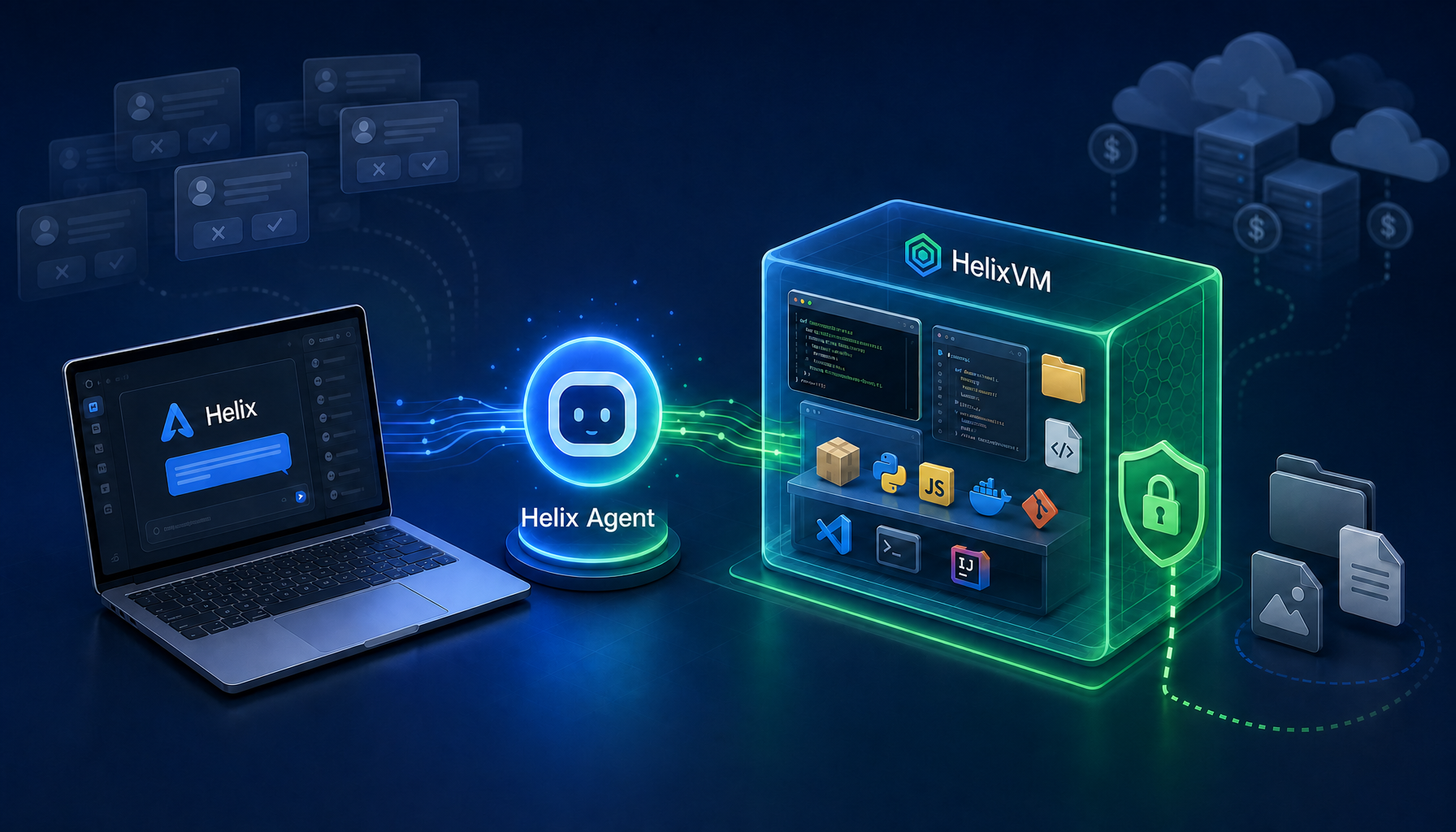
The harder I think about AI agent products, the more I believe the central problem isn't "can the model write code?" — it's:
Do you actually trust it enough to hand over the keys?
Give it too little permission, and it has to stop and ask for approval on every step. Give it too much, and it can quietly delete files, corrupt your environment, or even break your system.
This isn't an abstract design question. To actually finish a task, an agent has to touch real things: read files, change code, install dependencies, run commands, start services, move directories, access local ports.
So we built HelixVM — not because the world needs another VM tool, but to answer this:
How do we let everyday users run a high-efficiency AI agent safely, without forcing them to learn virtualization, buy cloud resources, or tolerate constant approval prompts?
A quick naming note: internally you'll see project names like aiagent, agentui, and helix-vm. For end users we want the brand to be cleaner: Helix Agent, Helix, and HelixVM.
1. Aggressive prompting looks safe — but isn't really
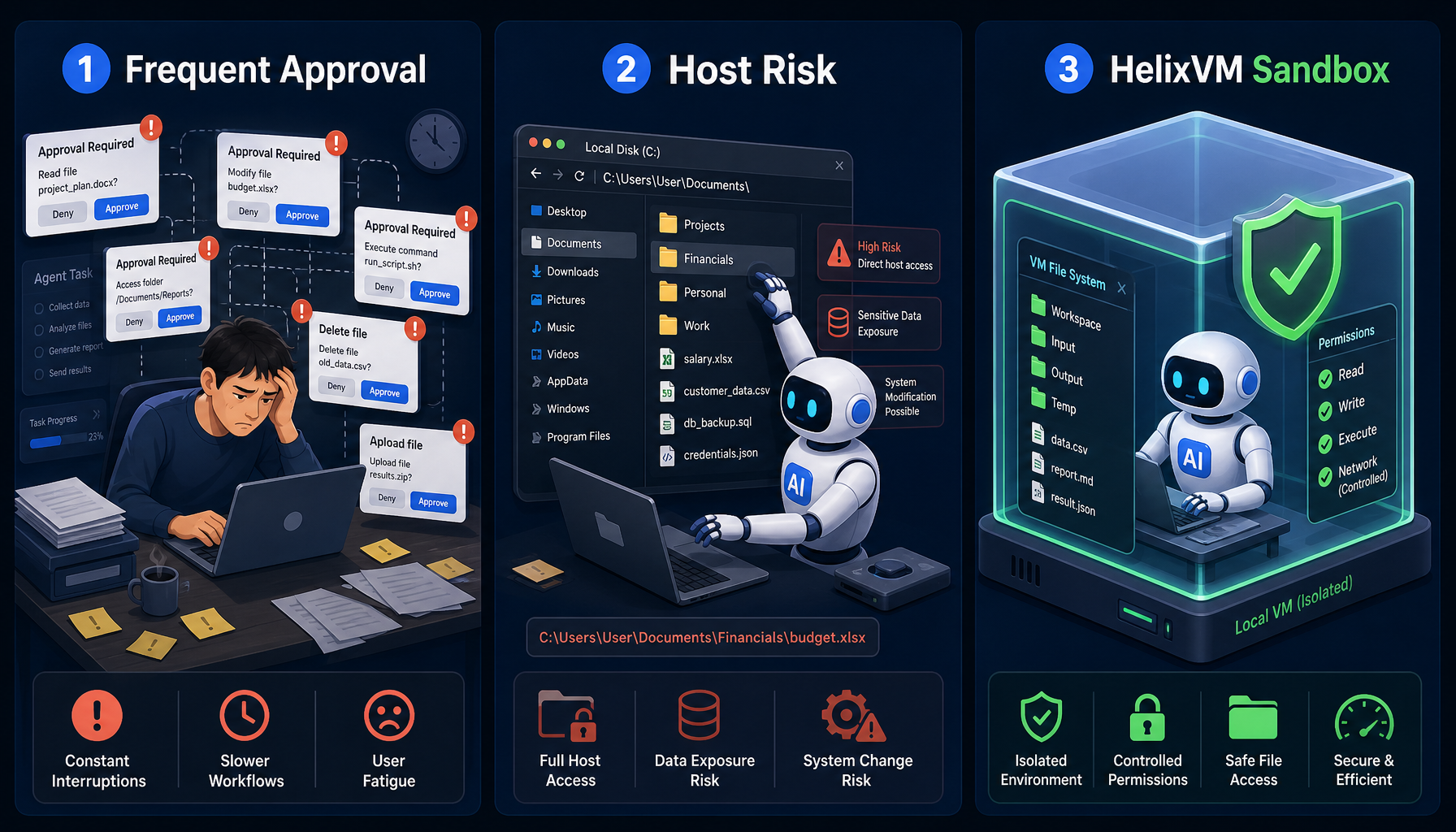
The permission model in many agent products is essentially: every potentially risky action triggers a confirmation dialog and waits for the user to approve.
On paper, this is reasonable. Should you confirm a file read? A code change? Running a shell command? Installing a dependency? Deleting a file? The user should know — sure.
The problem is what happens once the agent actually starts working continuously. The prompts pile up fast, and the user quickly falls into a pattern:
- Prompt, click approve
- Prompt again, click approve
- Prompt again, keep approving
- Eventually stop reading at all and just rubber-stamp everything
At that point "user confirmation" stops meaning anything. It doesn't reduce risk, but it absolutely slows everything down.
Worse, this design quietly shifts the safety burden onto the user: "I asked you. You clicked approve." But can a normal user really judge whether each shell command, each file write, each dependency install is safe? Usually not.
Constant approval is not safety. It's mostly the UI of safety.
2. Full permission is genuinely dangerous
The other extreme isn't an answer either.
If you grant the agent everything in the name of efficiency and let it execute freely on the host, the experience is glorious: no interruptions, no approvals, automatic code changes, automatic commands, automatic dependency installs, automatic cleanup.
This is exactly the kind of high-efficiency experience an agent should deliver — except it's all happening on your real machine.
Which means it can: delete your actual project files, corrupt your system environment, pollute your global dependencies, break a previously working dev setup, or run a destructive command in the wrong directory.
These aren't theoretical. Helix's early users hit them. Users of other agents have hit them too.
So we're stuck in a very concrete tension:
Efficiency means not asking every time. Safety means not letting the agent run naked on the host.
Most existing solutions swing between the two extremes. HelixVM tries a third path.
3. Cloud containers and sandboxes — right direction, wrong fit for many users
For the last few years, every cloud vendor has been talking about containers, sandboxes, remote dev environments, isolated cloud execution. The direction is right. An agent running inside an isolated environment is safer than one running directly on the user's machine.
But cloud-based solutions usually have a hidden assumption:
Safety = move to the cloud = consume cloud resources = enter the vendor's infrastructure stack.
That's great business for cloud vendors. But for many individual users, indie devs, and small teams, it's not the most comfortable answer. It typically means extra budget, remote environments, network latency, cloud resource management, and migrating your workflow onto someone else's infrastructure.
A lot of users do care about safety — they just don't want to buy a cloud subscription, learn another console, and maintain a remote environment as a prerequisite. If safety requires "go cloud first," you've already excluded all the local-first users.
4. Traditional local VMs aren't the answer either
So why not just spin up a local VM? VMware, VirtualBox, Parallels, or roll your own Linux with QEMU.
From a pure isolation standpoint, sure. But from a product experience standpoint, traditional VMs are too heavy.
First, they demand a lot of resources. Traditional VMs eat memory, CPU, and disk. Most users don't want a permanent desktop VM running just so an agent can edit some code.
Second, they demand a lot of knowledge. You need to understand images, disk layouts, networking, port forwarding, shared folders, system bootstrap, dependency installation. That's a lot for a normal user — and even people with a CS background often won't bother learning virtualization just to use an agent.
Third, even if you know how, it's still annoying. Today everyone is spoiled by one-click products. You can't really ask users to install VM software, download images, configure networking, tune ports, and manually launch the agent — all in the name of safety.
If the cost of safety is significantly more complexity, most users will just abandon safety.
5. So HelixVM's goal: make local VM isolation feel invisible
HelixVM's idea is simple:
Run the agent inside a lightweight local VM, but don't make the user feel the weight of a traditional VM.
Users don't need to know what QEMU is. They don't prepare images by hand. They don't configure port forwarding. They don't SSH into the VM to set up services. They don't buy a cloud server.
The experience should feel more like:
Pick an environment image → click Create → wait for boot → land in a ready agent workspace.
The isolation happens underneath. The complexity stays out of the user's face.
A traditional VM is a tool for the user to operate. HelixVM is an isolated runtime for the agent to live in. What the user actually cares about isn't "how do I configure the VM?" — it's "can my agent safely and efficiently get this done?"
6. How it works in Helix: Helix + HelixVM + Helix Agent
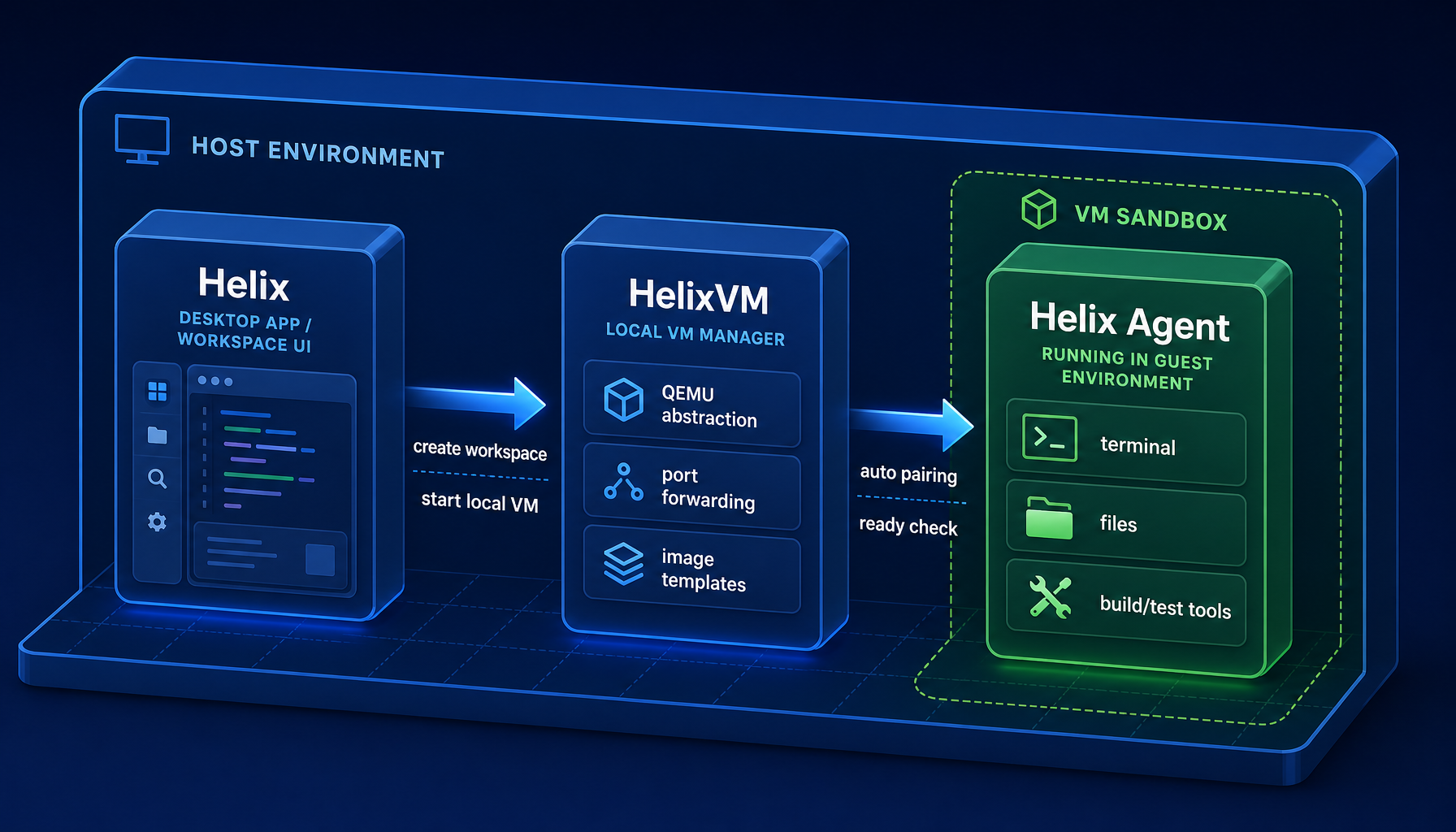
HelixVM isn't a single feature — it's an experience produced by several layers of Helix working together. From the user's perspective: pick a VM workspace, pick an image, create, then enter a ready agent workspace. Underneath, three layers cooperate.
Layer 1: Helix — the user-facing experience
Helix is the product surface users actually see. It exposes the VM workspace entry, starts the local HelixVM control plane, lets the user pick an image, creates the VM, manages port mappings, waits for both VM and in-guest Helix Agent readiness, and finally drops the user into a usable workspace.
One thing worth emphasizing: HelixVM's control plane is local by default — you don't need to register a remote cloud console first.
Layer 2: HelixVM — the local VM control plane
HelixVM is where all the messy VM details get wrapped up. It handles things the user shouldn't have to: the VM registry, template and downloaded image management, parsing bundles / disk images, allocating control / SSH / business ports, generating low-level VM launch plans, starting and stopping VMs, checking guest readiness, and cleaning up residual processes.
In other words, the user doesn't deal with QEMU directly. QEMU is still doing the heavy lifting underneath, but it's hidden behind HelixVM.
Layer 3: Helix Agent — inside the guest
Once the VM is up, Helix's execution environment runs inside the guest, with Helix Agent at its core. It does the actual work: reading and writing the workspace, executing shell, running builds and tests, managing sessions, exposing the agent API, establishing trusted connections back to Helix.
What the user opens at the end isn't an abstract VM — it's a ready agent workspace.
7. Invisible pairing: no manual pairing codes
A lot of local / self-hosted agent systems have one painful step: pairing. To make the UI trust the local agent, you usually have to start a service, find a pairing code, paste it into the client, wait for the binding, and save credentials.
HelixVM does it more smoothly. When the VM is created, Helix generates a one-time bootstrap secret and hands it to HelixVM as part of the launch. HelixVM injects this bootstrap data into the guest startup parameters. Once Helix Agent starts inside the guest, it reads the secret and treats it as the first-time binding credential.
Helix then calls Helix Agent's pairing endpoint with that secret. Helix Agent verifies it: is the secret correct, expired, or already consumed? On success, Helix Agent enters a bound state and issues a long-lived credential.
From the user's perspective, all they see is: the VM is ready, and the agent workspace is already connected.
8. Port forwarding + ready checks: making the in-VM agent feel local
The agent runs inside the VM. Helix runs on the host. They need to talk. HelixVM's default network mode is port forwarding, allocating control, SSH, and business service ports.
Helix then runs health checks to confirm the in-guest Helix Agent is actually responding — not just that a VM process exists.
This matters. "VM running" only means the VM process started; it does not mean the agent inside is ready. So Helix waits for two layers of readiness:
- HelixVM reports guest control plane ready.
- Helix Agent's health check inside the guest passes.
That's why a HelixVM workspace looks simple to create, but the underlying flow is more than "spawn a VM process."
9. Image marketplace: a safe environment shouldn't start from scratch
Handing the user a blank VM isn't enough. What they actually need is a usable dev environment, not a Linux system waiting to be configured.
So HelixVM ships with a template / image marketplace. Users can pick an image that fits what they're doing, for example:
- Lightweight Linux + Helix Agent environment
- Common dev toolchain environments
- Browser-enabled automation environments
- Environments tailored to specific languages or project types
This is where the experience really clicks. "Safe isolated environment" stops being an ops task and becomes a product choice: What am I working on today? Pick the matching image.
10. For the first time, safety and efficiency aren't opposites
Helix has always been focused on high-efficiency agents. We don't want users to be interrupted constantly while the agent is working — the whole point of an agent is to chain a complex task end to end: search code, edit files, run tests, analyze errors, fix, verify, summarize.
If every step needs user approval, you lose most of that automation value. But we also don't want the agent running unrestricted on the host.
So HelixVM's role is very clear:
Get safety from an isolated runtime, not from constant approval prompts.
With HelixVM, the agent can move much more freely inside the VM. Even if it makes a mistake, the blast radius stays inside the virtual machine — not on your real system.
11. HelixVM isn't a "VM feature" — it's infrastructure for agent products
The VM is just the mechanism. The real change is what it does to the agent's permission model.
Traditional agent products keep swinging between two bad options:
- Option A: constant approvals. Looks safe, but fatigues the user, kills efficiency, and approvals end up perfunctory.
- Option B: full permission. Efficient, but the agent is touching your host directly.
HelixVM offers a third one:
- Option C: a highly permissive agent, inside an isolated environment. Inside the VM, the agent works fast. Outside the VM, the host still has a clear safety boundary.
This is the shape of AI agents I think actually fits everyday users: safe but not annoying; efficient but not naked on your machine.
Closing
HelixVM isn't trying to teach users how to run a VM. The opposite — we want users to get VM-level isolation without ever needing to understand a VM.
What we want to leave them with is a simple loop:
Pick an image. Click create. Let the agent work.
No cloud server. No VMware install. No virtualization crash course. No frantic approval clicking. And no agent running naked on your real machine.
We want AI agents to be more automated — but automation shouldn't cost you your real system. That's what HelixVM is for.
HelixVM is currently in private beta. If this resonates, come join the Helix beta and try it out.