Manager Mode:Helix 如何让 AI Agent 在真实工程任务中保持不偏航

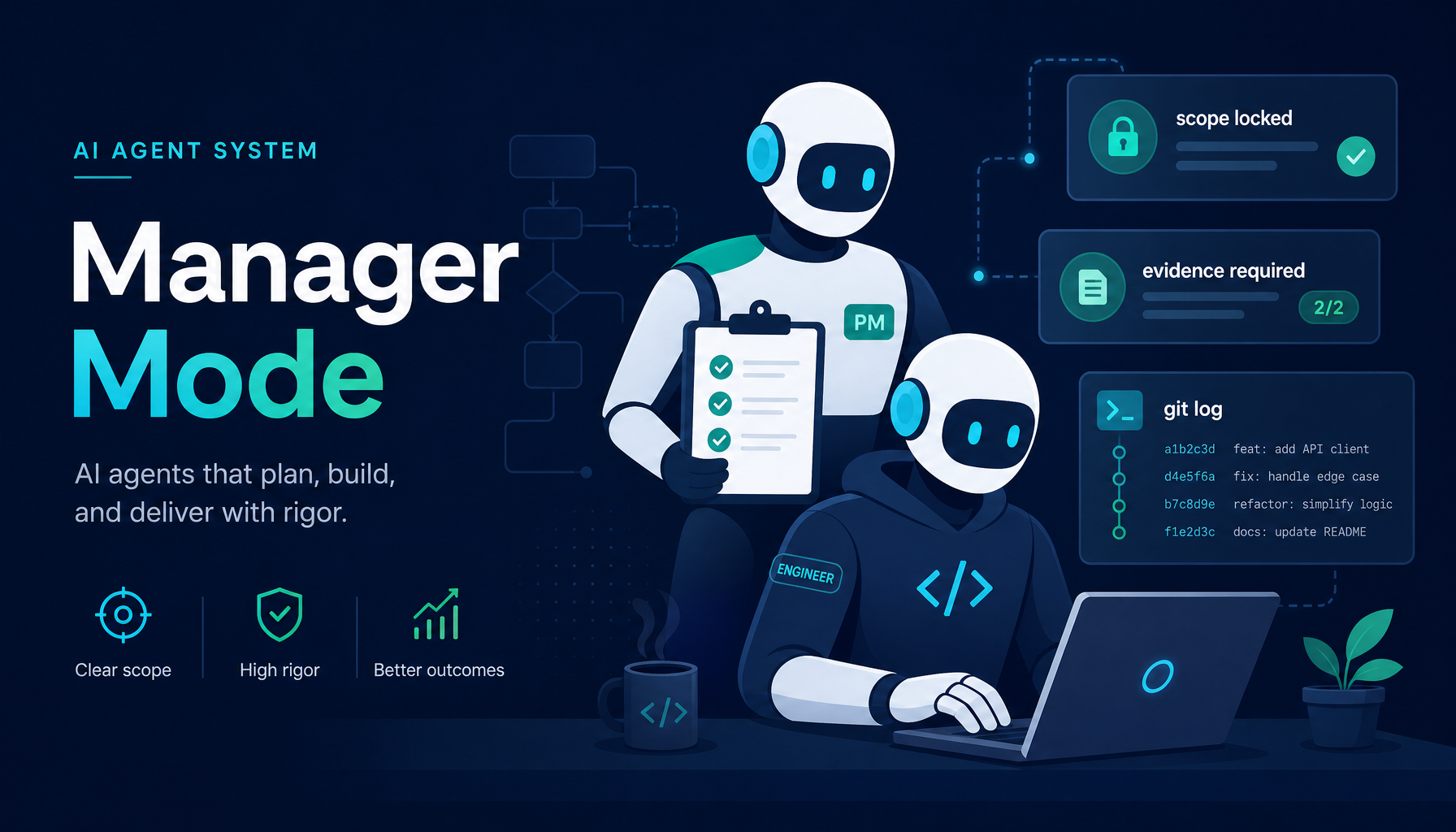
大多数 AI Agent 失败并不是因为能力不足 —— 而是因为它们会偏航。
它们从用户的意图出发,逐渐积累势能,最后却做了十二件用户从未要求过的事情;又或者在任何东西真正交付之前,就宣告任务完成。
Helix 的 Manager Mode 就是针对这一问题在架构层面给出的答案。它不是一个更长的 prompt,不是一段更聪明的 system message,而是一套真正在系统层落地的多 Agent 编排架构 —— 一个负责守目标、一个负责推执行、若干个负责并行钻深度,三者职责严格分离,互相约束。
1. 没人愿意正视的「偏航」问题
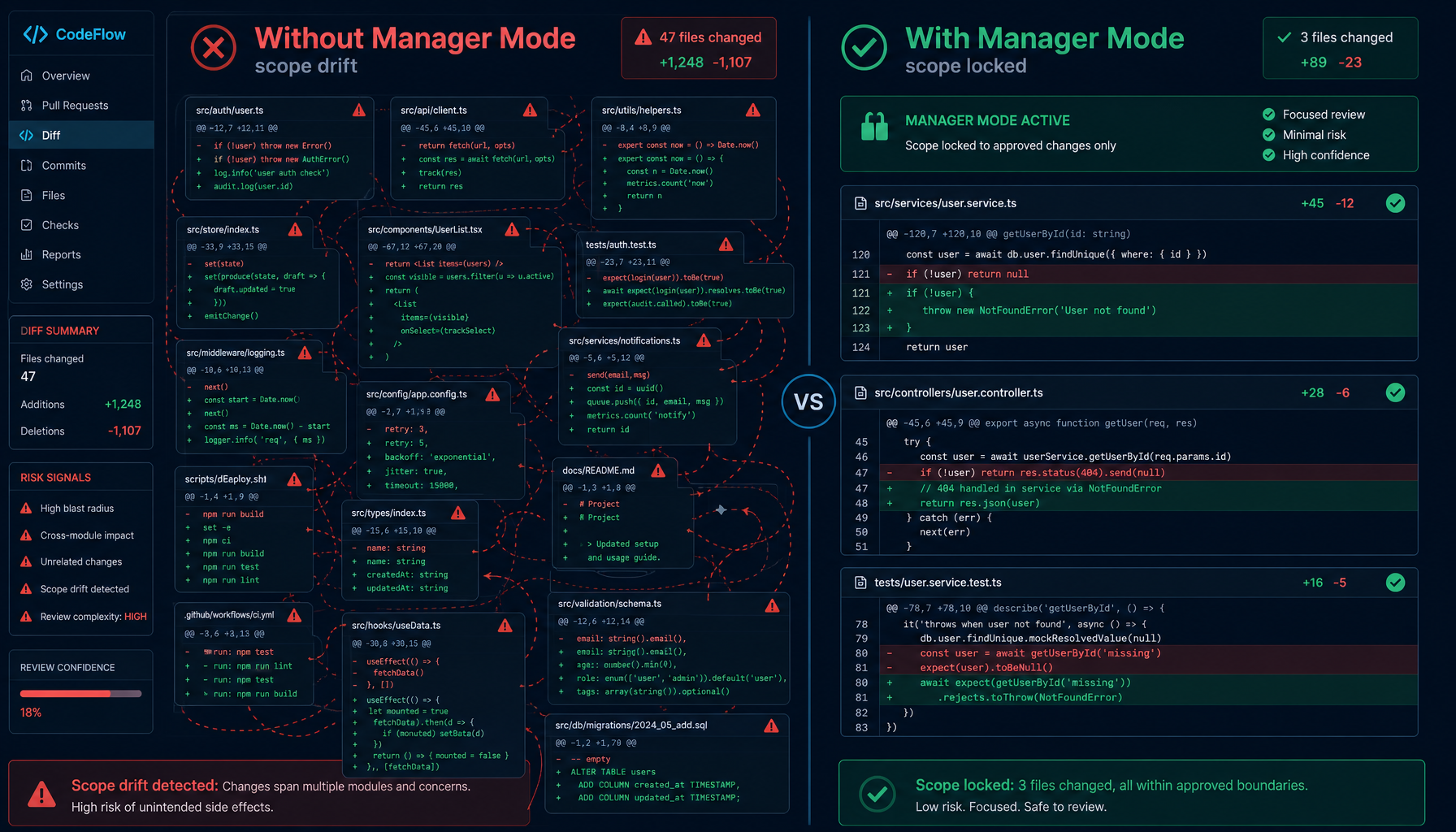
用户让 AI 「重构认证模块」。三分钟后,它已经:
- 重构了认证 ✓
- 「顺手优化」了一堆无关的工具函数
- 在五个文件里改掉了原本统一的错误处理约定
- 引入了一个它觉得「明显更好」的新依赖
- 写了一段总结,解释为什么这一切都是必要的
核心任务也许是完成了。但用户现在面对的是横跨四十个文件的 diff,code review 简直是噩梦,谁也搞不清楚哪些是真正想改的、哪些是 Agent 自己决定要改的。
这就是 scope drift(范围偏航)。它的根源很直接:单 Agent 系统没有把「理解用户要什么」和「决定它要做什么」分开。这两件事被压缩进同一条线,没有任何护栏。
更要命的是另一个对偶问题 —— 过早收工。Agent 写了一段非常工整的总结:"已完成认证模块的重构,包含 X、Y、Z 三项改动。" 用户回去打开仓库,发现 git log 里根本没有那条提交,分支也没有合并回 main,测试甚至从来没跑过。
偏航和过早收工,看起来是两类问题,根源是同一个:没有一个独立的角色在守"用户最初要的是什么"和"这件事到底做完了没有"。
Manager Mode 用三层架构解决了这一问题:意图保持、任务执行、并行子任务处理交由各司其职、相互独立的 Agent 来完成。
2. 什么是 Manager Mode
Manager Mode 是 Helix 面向复杂、多步骤工程工作的编排层。
启用它时,会话会获得一个 Manager Agent,它位于用户和执行环节之间。Manager 不写代码,也不调用工具。它的职责只有四件事:
- 接收用户的请求并原样转交给 Execution Agent —— 不做任何改写
- 验证实际完成的事情是否和用户真正提出的需求一致
- 严格执行「完成」的定义,覆盖提交、合并、验证以及干净的工作区
- 在五项标准全部满足且有证据支撑之前,拒绝把任务标记为已完成
Execution Agent 处理真正的工作,把任务拆成子任务,并通过 SubAgent 并行执行。但它始终在 Manager 设定的范围约束下运行。
可以这样理解:每个任务都配了一位技术 PM 和一位资深工程师,而 PM 唯一的工作就是确保工程师不偏离剧本。在真实团队里,这样的角色分工已经被验证过几十年;Helix 把它原样搬到了 AI Agent 系统里。
3. 三层架构
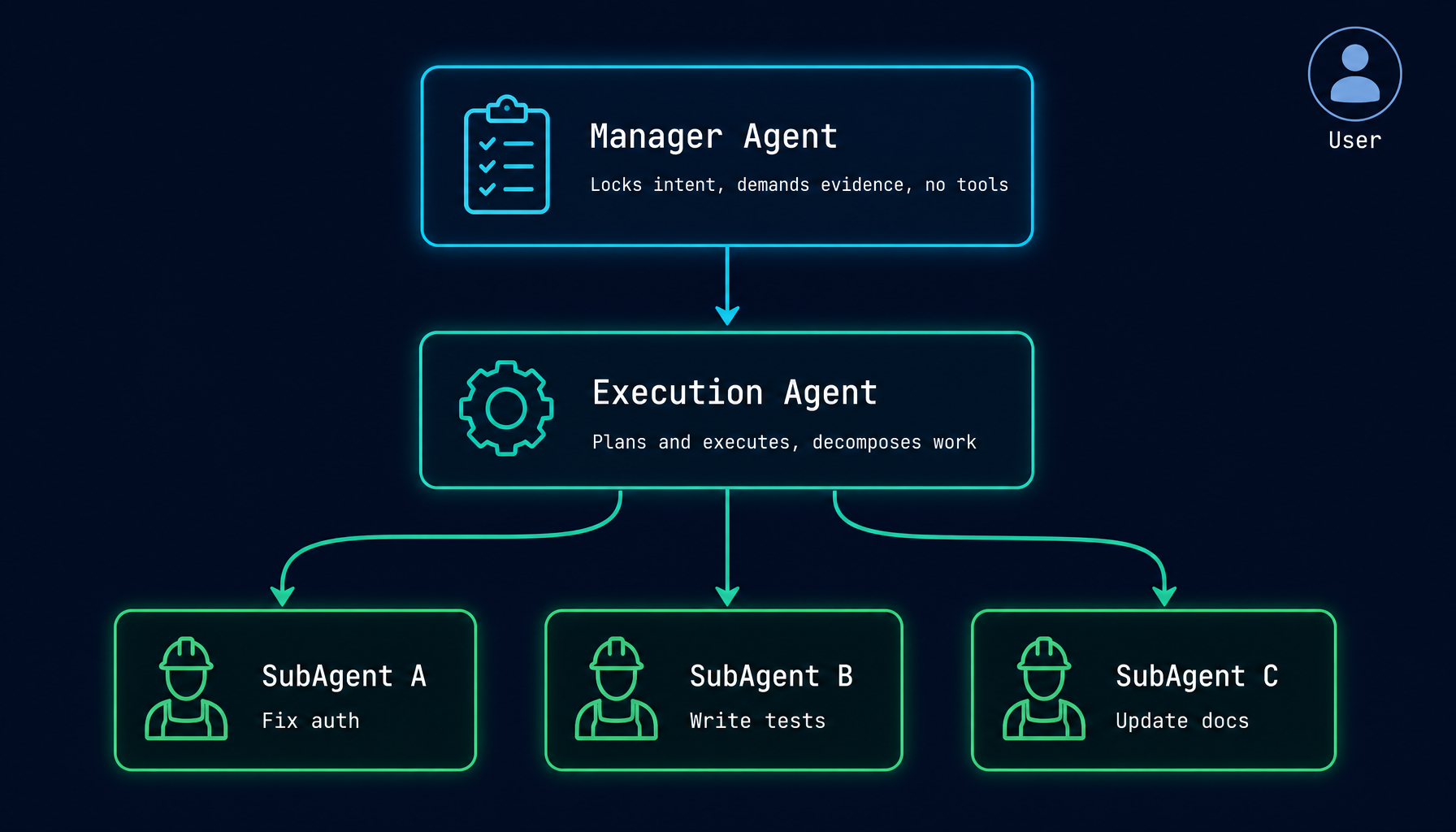
下面是这三层之间的协作关系:
- You(用户) 通过 chat/UI 提交任务。
- Manager Agent 锁定原始意图作为基线;以 verbatim 方式把任务转交给 Execution Agent;按"实现 + 提交 + 合并 + 验证 + 干净工作区 + 无越界改动"六项维度检查完成;要求证据,而不是总结。
- Execution Agent 真正干活的那一层:规划并实现,拆分子任务,调用文件编辑 / shell / LSP / MCP 等所有工具,最后以可验证的证据汇报回去。
- SubAgent A / B / C 是 Execution Agent 通过
run_subagent派发出的并行执行单元,每个 SubAgent 专心做一件独立的事,全部共享 Execution Agent 的 git worktree。
SubAgent 共享 Execution Agent 的 git worktree —— 它们都在仓库的同一份工作副本中运作。Execution Agent 协调所有文件改动,并在任务完成时将结果提交并合并回主分支。
SubAgent 不能再派生出新的 SubAgent。 这一限制是有意为之。Agent 系统中无界限的递归会导致难以预测的资源占用和难以追踪的执行路径。三层上限在系统层面强制生效,而不是写在 prompt 里的口头约定。
把这三层放在一起看,关键的设计立场是:没有任何一个 Agent 同时承担「定义目标」和「执行目标」。 PM 不写代码,工程师不改需求。这件事在真实团队里被称为「职责分离」,在 AI Agent 里被叫作 Manager Mode。
4. 核心机制
4.1 范围锁定(Scope locking)
当 Manager Agent 收到用户的请求时,会把原始意图记录为基线。Execution Agent 的每一个后续动作都会对照这条基线评估。
规则非常严格:
- 用户没有要求过的「优化」 → 越界
- 触及与任务无关文件的重构 → 越界
- 因为 Agent 觉得「更好」而引入的新依赖 → 越界
Manager 会在心智模型中维护「哪些属于本任务、哪些不属于」的清单。如果 Execution Agent 试图扩大范围 —— 即便理由听起来合理 —— Manager 会标记出来,要么拒绝,要么作为显式提议浮现给用户。
这里有一个常被忽略的细节:Manager 没有任何文件工具,也没有 shell 访问权限。它只能观察和指挥。这种"看不见手的人"的设计正是范围执行可信的根本 —— 监督者不会被诱惑去「再多修一件事」。
为什么不能用 prompt 直接解决? 这是很多人第一次听到 Manager Mode 时会问的问题 —— 既然 Manager 只是"守目标",为什么不直接在 system prompt 里写一句"请勿越界"就好?
答案是:prompt 没有强制力。让同一个 Agent 既负责"理解你要什么"又负责"决定做什么",最终它一定会用"我觉得这个改动更好"覆盖掉"用户没要求过这件事"。只有当监督者和执行者是两个独立实例、监督者根本没有动手能力,约束才真的成立。这是架构层面的设计,不是 prompt 工程能弥补的。
4.2 五项完成标准
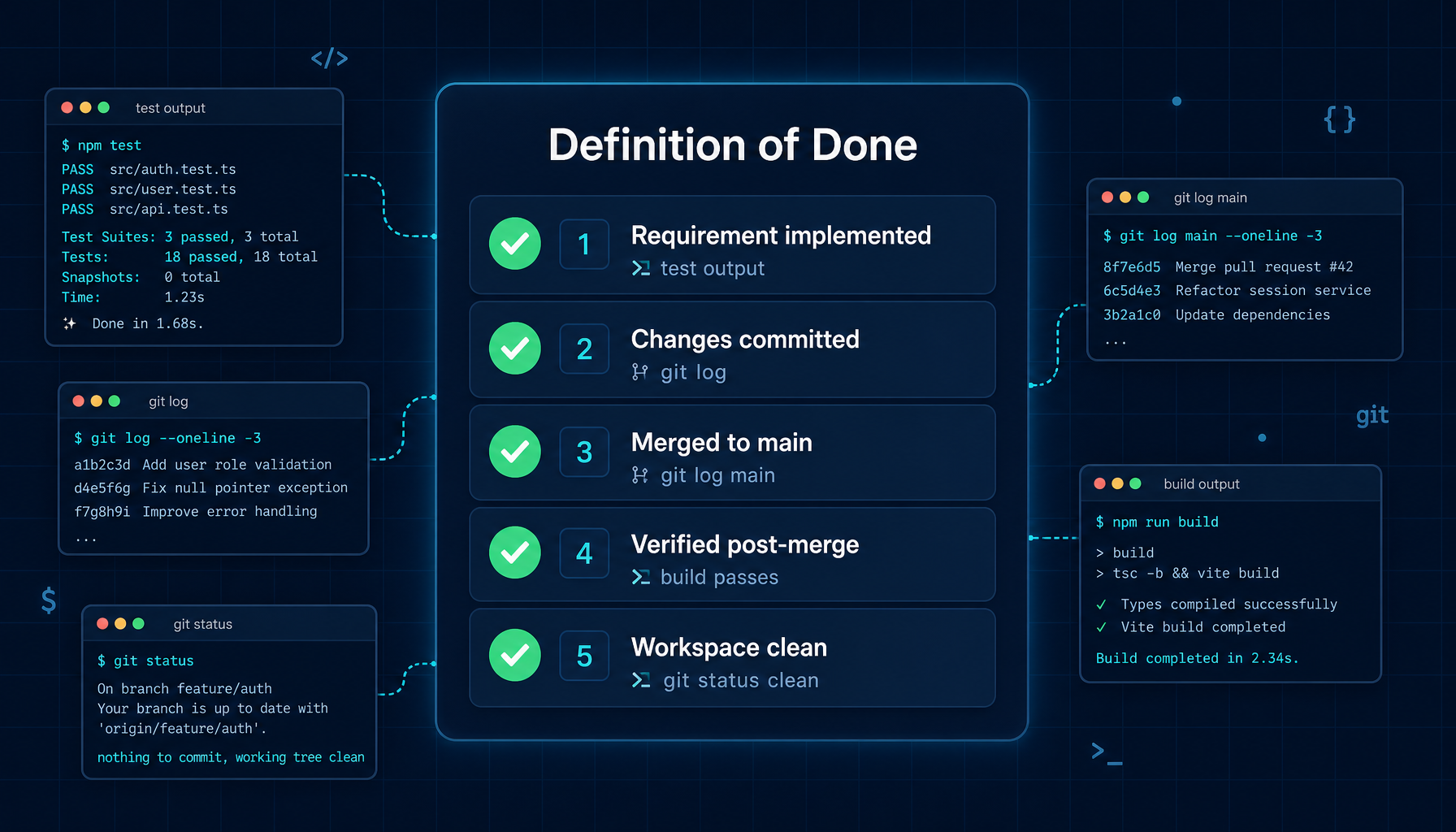
只有当下列五项标准全部满足、且每一项都有可验证的证据时,Manager 才会把任务标记为完成:
| # | 标准 | 何谓证据 |
|---|---|---|
| 1 | 原始需求被正确实现 | 测试输出、相关命令的执行结果 |
| 2 | 改动已提交 | git log 显示该提交 |
| 3 | 已合并到主分支 | git log main 显示该次合并 |
| 4 | 合并后主分支验证通过 | 合并后在 main 上重新构建/测试 |
| 5 | 工作区干净,没有越界改动 | git status 干净,diff 仅包含预期文件 |
「Agent 说自己完成了」不算数。Manager 要求的是真实的命令输出、工具结果或测试运行。这就消除了那种最常见、也是最隐蔽的失败模式:Agent 总结出一份成功,但实际并未交付成功。
这条原则会在不少时刻让人觉得"Manager 太较真了" —— 直到第一次真正撞到一种情况:Execution Agent 报告"已完成",Manager 却拉起 git status 发现工作区还有未提交的改动,于是把任务退回继续做。这一刻用户才会意识到,"完成"这两个字到底意味着什么。
4.3 SubAgent 并行执行
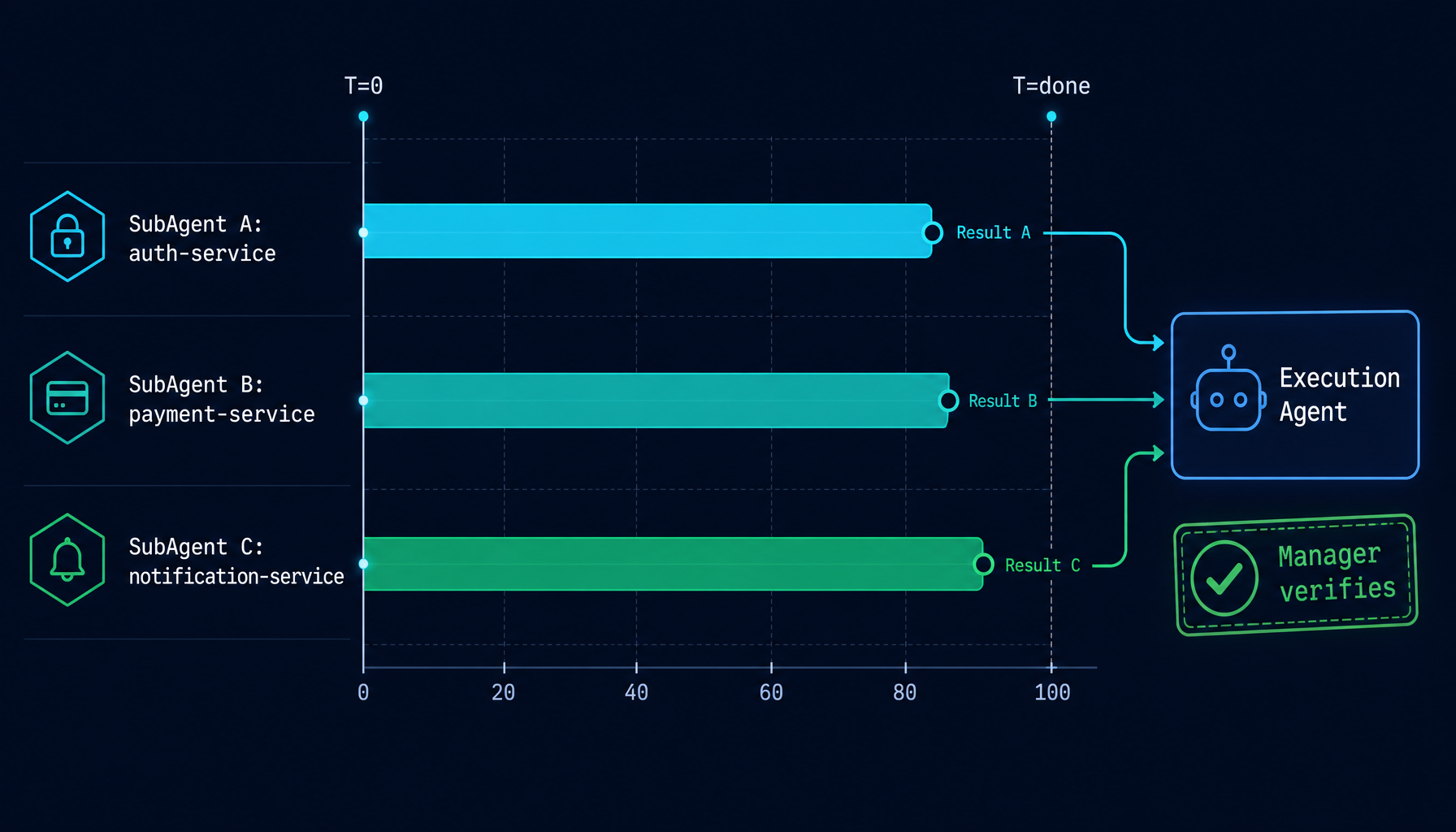
当 Execution Agent 识别出彼此独立的子任务后,会以 SubAgent 的形式并行派发:
Execution Agent calls run_subagent("Fix auth module",  model="claude-sonnet-4-5")
Execution Agent calls run_subagent("Write tests",      model="claude-sonnet-4-5")
Execution Agent calls run_subagent("Update docs",      model="claude-haiku-4-5")
          ↓                              ↓                      ↓
    [runs in parallel]            [runs in parallel]     [runs in parallel]
          ↓                              ↓                      ↓
    SubAgent returns result       SubAgent returns result  SubAgent returns result
          ↓                              ↓                      ↓
                    Execution Agent collects all results
                              ↓
                    Runs verification, hands evidence to Manager
SubAgent 共享 Execution Agent 的 worktree,并通过 Execution Agent 协调文件改动 —— 由后者负责写入排序与最终的合并。这避免了并发 SubAgent 之间互相覆盖、产生竞态的局面。
并行不仅是性能加速。它还改变了用户的等待体验:原本"提一句,等很久;再提一句,再等很久"的串行节奏,被替换成"一次给出完整目标,多路推进同步交付"。
更重要的是 —— 因为有 Manager Agent 守在上游,并行带来的「失控风险」被压住了。三个 SubAgent 各自跑得再快,Execution Agent 也要按顺序合并它们的产出,Manager 也要按统一标准验证整体交付。速度提升,但边界不丢。
4.4 长任务下的上下文管理
长时运行的任务会积累大量历史。Helix 用两种机制保持会话健康:
KV Caching:大体量的工具输出(文件读取、命令结果、搜索结果)会被缓存,无需在每次 LLM 请求中重复发送。缓存对用户是透明的 —— 不需要配置,自动生效。
自动压缩(Auto-compression):当对话历史超过阈值时,Helix 会把较旧的消息压缩为简洁摘要,并把「活动窗口」向前推进。Agent 仍然保留对发生过的事情的完整理解,但无需为整段历史付出 token 代价。
这两种机制在常规使用中是不可见的。它们正是让一个50 轮的复杂任务,用起来跟 5 轮的小任务感觉一样轻的关键。
4.5 会话级身份一致性
当用户同时跑多个 Manager 会话时(一个在重构 auth、一个在做数据迁移、一个在写新 feature),Helix 会保证:
- 每个会话有独立的 Manager / Execution / SubAgent 实例栈
- 不同会话之间不会串味 —— A 任务的范围基线不会污染 B 任务
- 工作区切换时,会话状态、模型选择、连接配置都跟着切,不需要重新讲解
这一层"会话身份一致性"是后台机制,用户感知不到,但它正是让 Manager Mode 可以安心放着跑的前提。
5. 如何使用 Manager Mode
5.1 启用方式
在工作区选择页中,会看到一个 Manager 入口与 Chat 选项并列。点击它即可打开一个 Manager 会话。三层架构会自动生效,用户不需要做任何额外配置。
5.2 为 Manager Mode 写好任务请求
当请求清晰指明范围边界时,Manager Mode 的效果最佳。对比一下:
不够有效:
改进登录流程
更有效:
重构登录流程,使其使用新的 AuthService 接口。只改动
src/auth/和src/components/Login/中的文件。不要修改 API 契约。
Manager 会以用户的请求作为范围基线。越精确地描述哪些属于范围之内,它就能越精确地阻止偏航。
用户不必把所有细节列尽 —— Manager 能处理一定的模糊度。但显式的范围边界能让它拥有更硬的约束去执行。
实践中一个朴素的判断信号:如果用户通常会先写一份任务说明或工单再交给另一个人去做,那这个任务大概率适合 Manager Mode。
5.3 处理范围扩张的提议
有时 Execution Agent 会发现一些它认为应当纳入任务的内容。Manager 不会悄悄地把它们包含进来,而是作为明确的问题反馈给用户:
Execution Agent found an issue in the session middleware that may affect
the auth refactor. This was not in the original scope.

Expand scope to include middleware fix? [Yes / No / Defer]
回答 "No" 或 "Defer" 可以让当前任务保持纯净。用户随时可以另起一个会话来处理后续工作。这是 Manager Mode 给"专注"和"灵活"之间提供的明确分界线。
5.4 监控进度
Manager 会话运行时,用户可以实时看到:
- 哪些 SubAgent 正在运行、它们在做什么
- 每个 Agent 的 token 使用情况
- 正在进行中的工具调用
- worktree 中当前还有哪些待处理的改动
这些都呈现在会话面板的实时事件流中。如果用户离开一段时间回来,可以直接从事件流中回看 Execution Agent 派发了哪些 SubAgent、各自的结果、Manager 的逐项完成判定记录。
6. 真实场景
场景 1:跨多模块的 API 迁移
任务: 将三个服务模块从 REST 迁移到 gRPC。
没有 Manager Mode: 用户启动一个会话,Agent 开始迁移 auth service,发现 user service 有类似的模式,于是顺手开始改它,接着意识到测试 fixture 需要更新,再接着决定「既然都改到这里了」就把 error type 也重构一下。两个小时后,得到一个跨越十一个模块的 diff,构建还坏掉了。
有 Manager Mode:
用户提交:
把 auth-service、payment-service 和 notification-service 从 REST 迁移到 gRPC。使用
/proto/中已有的 proto 定义。不要触碰其他服务或共享工具。
Manager 锁定这一范围。Execution Agent 派发三个 SubAgent —— 每个服务一个,并行运行:
SubAgent A: auth-service migration      [parallel]
SubAgent B: payment-service migration   [parallel]
SubAgent C: notification-service        [parallel]
每个 SubAgent 独立工作。三者全部完成后,Execution Agent 执行合并序列并验证构建。Manager 审查最终 diff,确认它只触及指定的三个服务,然后呈现给用户一个 commit hash、测试结果和干净的 git status。
最终范围:恰好就是用户要求的内容。
场景 2:在大型代码库中重构并保证测试覆盖
任务: 一个遗留数据模型类(LegacyUserRecord)需要在大型代码库中被新的 UserProfile 类型替换 —— 涉及 60+ 个文件。
没有 Manager Mode: 单 Agent 会话在长任务中会跟丢自己的进度。它可能改完 40 个文件,以为已经完成,然后写一段总结就停下来;或者改了 60 个文件,但在不同部分对边界情况的处理出现了细微的不一致。
有 Manager Mode:
Execution Agent 通过 LSP 工具找出对 LegacyUserRecord 的全部 63 处引用,按模块分组,并为每组派发 SubAgent:
SubAgent A: core domain models (12 files)
SubAgent B: API layer (8 files)
SubAgent C: service layer (18 files)
SubAgent D: repository layer (14 files)
SubAgent E: test files (11 files)
每个分组在内部保持自洽。所有 SubAgent 完成后,Execution Agent 跑完整的测试套件。Manager 验证:
- 全部 63 处引用都已迁移(通过
grep -r LegacyUserRecord返回为空) - 测试通过
- 没有无关文件被改动
如果某个 SubAgent 漏掉了一处引用或引入了 regression,Manager 会指出具体差距,并把 Execution Agent 派回去专门修复那一点 —— 而不是一切重来。这一点在长任务中尤其关键:一处遗漏不必让整个任务回到原点。
场景 3:带有合并协调的并行特性开发
任务: 实现一个新的 analytics dashboard,包括后端 API 端点、前端组件和数据库迁移 —— 三条彼此独立的工作流。
挑战: 三位工程师通常会并行推进。但用单 AI Agent 来做,就只能按串行慢慢磨。
有 Manager Mode:
用户发送:
构建 analytics dashboard 特性。后端:在
src/api/中新增/api/analytics/summary和/api/analytics/events端点。前端:在src/components/中创建AnalyticsDashboard组件。数据库:为analytics_events表新增 migration。它们彼此独立 —— 请并行处理。
Execution Agent 同时派发三个 SubAgent:
SubAgent A [backend]   → writes API endpoints, runs unit tests
SubAgent B [frontend]  → builds React component with mock data
SubAgent C [database]  → writes migration, tests locally
SubAgent A 和 C 先完成,SubAgent B 大约在 40 秒后完成。随后 Execution Agent:
- 按顺序收集并应用三个 SubAgent 的结果
- 跑覆盖三层的集成测试
- 修复一处合并带来的小 import 路径冲突
- 验证完整测试套件通过
Manager 确认:三条独立的工作流,在大约相当于串行完成其中一条的时间里全部完成,且通过了集成验证。
7. 何时使用 Manager Mode
Manager Mode 会引入额外的编排开销。对于快速、范围明确的任务来说,往往用不上。下面是一份大致的选择指南:
| 任务类型 | 推荐模式 |
|---|---|
| 快速提问、解释、代码片段 | 标准 chat |
| 单文件编辑或小型 bug 修复 | 标准模式或 Coder 模式 |
| 单个模块内的多文件重构 | Coder 模式 |
| 跨模块重构、跨多层的特性 | Manager Mode |
| 大规模迁移(多文件、多并行工作流) | Manager Mode |
| 需要离开一会儿的长任务 | Manager Mode |
| 此前曾被 scope drift 坑过的任务 | Manager Mode |
判断信号:如果通常会先写一份任务说明或工单再交给另一个人去做,那这个任务大概率适合 Manager Mode。
反过来也成立:如果只是想问一句"这段代码为什么报错",Manager Mode 的三层架构对这种任务来说太重了,标准 chat 已经够用。好工具的标志之一,是知道什么时候不用它。
8. 让它在实践中可靠的设计选择
下面这些设计决策让系统不仅在理论上自洽,在实战中也可靠:
Manager 永远不执行。 它没有任何文件工具,也没有 shell 访问权限。它只能观察和指挥。这种分离正是范围执行可信的根本 —— 监督者不会被诱惑去「再多修一件事」。
SubAgent 受递归限制。 SubAgent 不能再派生出新的 SubAgent。这是系统层面的硬性约束,不是 prompt 里的提醒。它让执行深度可预测,也避免了失控的分支。
证据是必需,而非可选。 Manager 的完成检查并非「Agent 说完成了吗?」,而是「我能看到证明它完成的命令输出吗?」。Prompt 明确强化了这一区别,并由系统在判定逻辑中固化下来。
Worktree 由 Execution Agent 管理。 SubAgent 共享 Execution Agent 的 git worktree。Execution Agent 负责协调并行子任务的写入顺序,避免来自并发 SubAgent 的改动相互冲突。
重试是内建能力。 每次 LLM 调用都使用指数退避重试(最多 3 次,初始延迟 2s)。瞬时 API 失败不会打断长任务。
会话身份隔离。 多个 Manager 会话之间彼此独立 —— 角色基线、范围记忆、SubAgent 状态都不会串味。这让"同时跑多个任务"成为一件可以放心做的事。
9. 开始使用
如果还没启用 Manager Mode:
- 打开 Helix,新建一个会话
- 在工作区选择页点击 Manager 入口
- 写下任务,并明确范围边界
- 在事件流中观察子任务的并行执行
当一个本来会偏航的任务第一次保持干净 —— 或者第一次看到三个 SubAgent 在几分钟内完成原本需要一周的并行工作 —— 用户就会真正理解这个模型。
想了解 Helix 整体如何把 Agent 当作工程系统来设计,请阅读 Introducing Helix。
Manager Mode 在每个会话背后默认启用 Automatic Worktree:Execution Agent 不会在用户主分支上直接动手,而是在隔离分支里完成所有改动。
如果在 Manager Mode 里跑的是涉及环境改动的"重活",HelixVM 能把执行边界进一步变成安全边界。
10. 接下来的计划
Manager Mode 仍在持续打磨:
- 更丰富的证据页面 —— 可视化展示每个 SubAgent 做了什么,附带 diff 摘要和测试结果
- 范围扩张提议 UI —— 更清晰的界面用于审查和审批范围扩张请求
- 工作流模板 —— 为常见场景(迁移、特性构建、测试覆盖)预置任务模板
- 团队可见性 —— 让协作者也能看到任务的实时执行状态,把"Agent 在做什么"从一个人的工作流变成团队级别的协同视图
如果遇到了边界场景、它在哪里失灵、或者哪里出乎意料地表现优秀 —— 都欢迎反馈给团队。Manager Mode 会在真实工作负载中持续变得更好。