Automatic Worktree: Stop Letting Agents Run Around on Your Main Branch

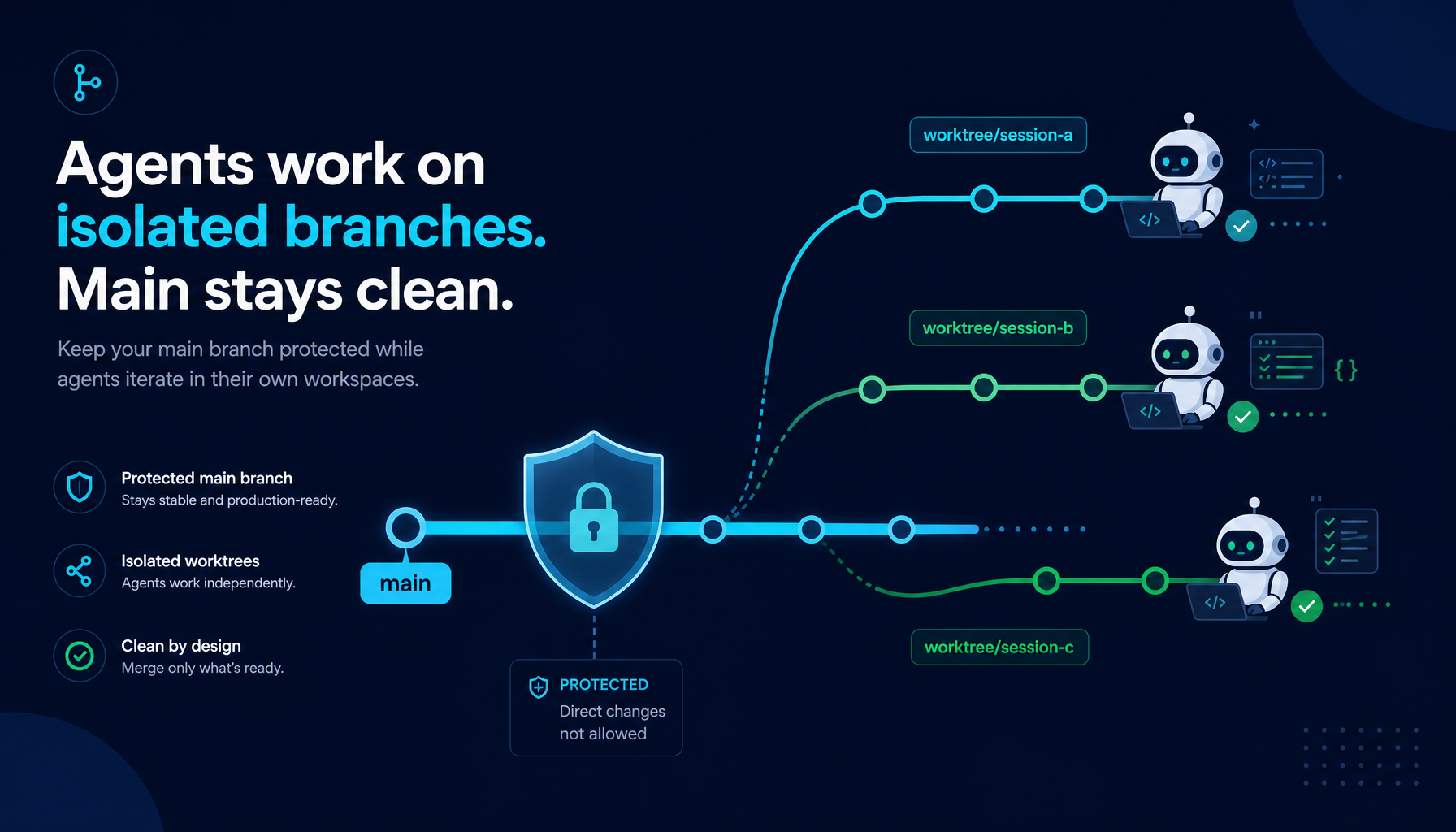
Every coding agent eventually writes to your repository.
The question is: what branch does it write to?
Most AI coding tools answer that question by making it your problem. Helix answers it at the system level, before the agent touches a single file.
This is the third boundary in Helix's multi-agent architecture. Manager Mode guards the boundary of intent. HelixVM guards the boundary of the host machine. Automatic Worktree guards the boundary that matters most to your code: the repository branch.
1. Writing directly to main: the part agent demos quietly skip
When an AI agent edits files, it needs somewhere to put them. The path of least resistance is the working directory the user opened — which is usually main itself.
This creates a class of problems nobody talks about in agent demos:
- A task that dies halfway leaves main dirty. The agent started a refactor, got three files in, hit an error, and stopped.
git statusis a mess. The user has no clean way to tell what is safe to commit and what should be rolled back. - Concurrent tasks collide. Run multiple agents or sessions simultaneously, and they all write to the same checkout. File conflicts are unpredictable, hard to debug, and impossible to attribute — you cannot always tell which session dirtied which file.
- Rollback is painful. The agent made changes the user did not want, but also made changes the user did want. They are tangled together in the same working copy, with no clean boundary to revert.
- There is no "review before merge". The code is already on main. Review becomes retroactive acknowledgement instead of a preventive gate.
The worktree problem is not unique to AI agents. It is a well-understood challenge in any parallel development workflow. Git's own answer is the worktree: a separate checkout of the repository on a separate branch in a separate directory, with changes kept isolated until they are deliberately merged.
The real question is: who creates and manages that worktree?
2. The industry's answer: opt-in worktree + manual merge
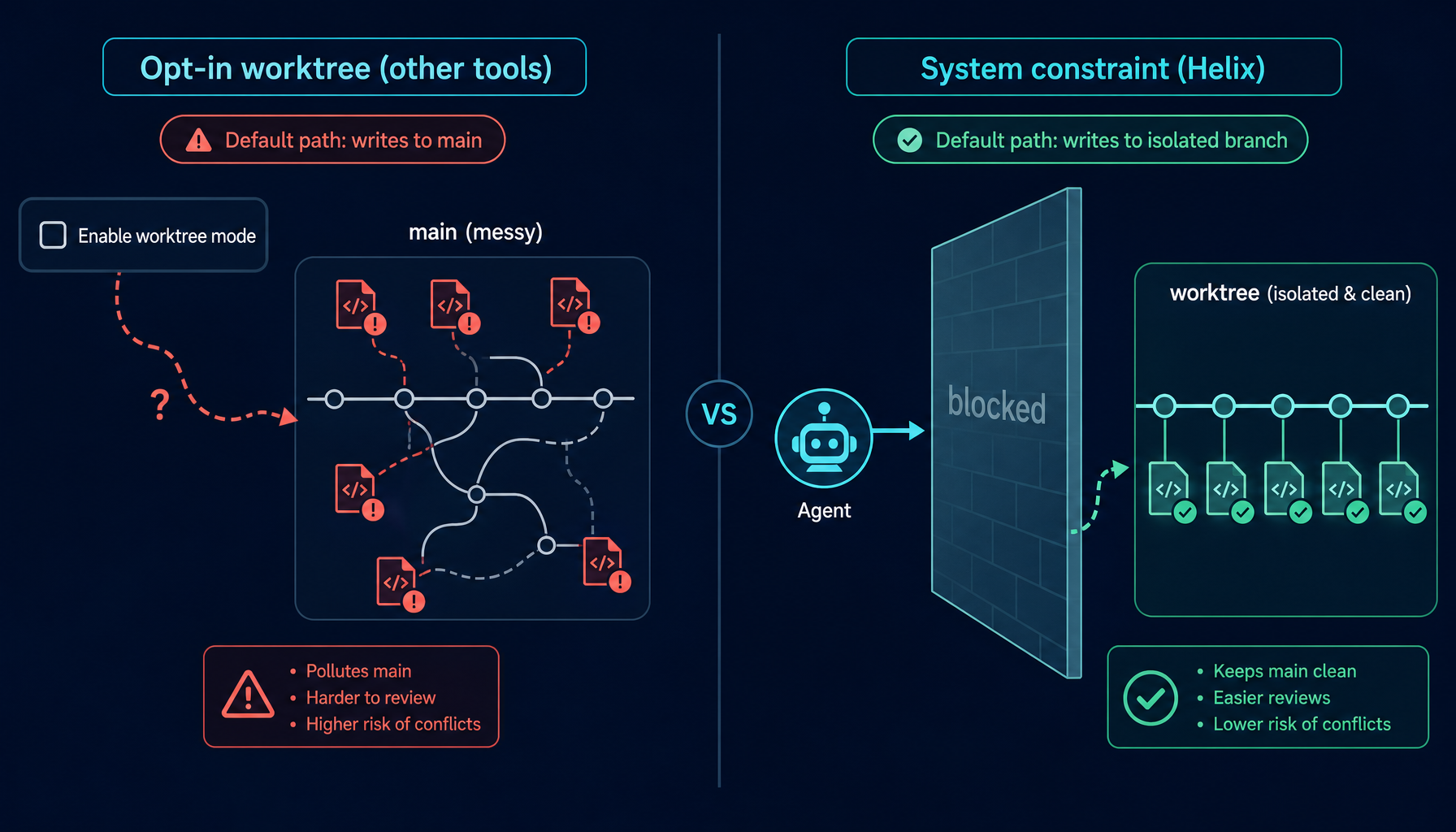
Several coding agent tools have added worktree support. The pattern is consistent:
User: enable worktree mode
Tool: ok, worktrees are now enabled
User: run task
Tool: creating worktree... done
User: review output
User: merge branch          ← manual step
There are two structural problems with this shape:
Worktrees are opt-in. Users have to know the feature exists and remember to turn it on. Forget — or decide a small task is not worth the ceremony — and the agent writes directly to the working copy again.
Merge is always manual. The tool creates the worktree and supervises the agent, but bringing changes back to main is the user's job. That is fine for a single task. Across five concurrent tasks, or a workflow with dozens of daily agent runs, the manual merge cost compounds into real friction.
The direction is right. But "opt-in worktree with manual merge" still leaves the default path — the unconfigured, don't-think-about-it path — pointing straight at main.
And most accidental main-branch pollution starts exactly there: "It's just a small task, I won't bother with a worktree."
3. Helix's approach: worktree as a system constraint
In Helix, worktree isolation is not a feature users enable. It is an architectural constraint built into how agents interact with repositories. The rules are enforced at the system level, not asked for in a prompt.
Helix puts three hard rules around worktrees:
-
No binding, no write. Neither the Execution Agent nor any SubAgent can write to a git-tracked file on the current branch until a worktree binding exists for that repository. This is not a warning — the system rejects the write outright.
-
Bindings are declared by the agent, not configured by the user. When the agent decides a task requires changes to a repository, it calls
create_worktree_bindingfirst. The system creates the worktree, generates an isolated branch, and returns the path the agent should work in — all of this happens before the agent touches a single file. -
Merge is automatic. When the session completes, code review passes, and the changes are committed, the system automatically merges the worktree branch back to base, removes the worktree, and deletes the temporary branch. Users do not have to manage any of it.
The end-to-end flow, as seen by a user, looks like this:
Agent: I need to write to /projects/my-repo
Agent: create_worktree_binding(project="/projects/my-repo", task="add auth middleware")
System: worktree created
        branch: aiagent/{session}/add-auth-middleware-a3f7c91d
        base:   main
Agent: [works entirely inside the worktree path]
Agent: [task complete, code review passed]
System: stage → commit → switch to main → pull → no-ff merge → remove worktree → delete branch
The agent never had access to main. Main was not dirty for a single moment during the task. The merge landed as a clean, traceable commit.
Isolation is not a toggle. It is the system's default shape.
4. The session lifecycle: from binding to cleanup
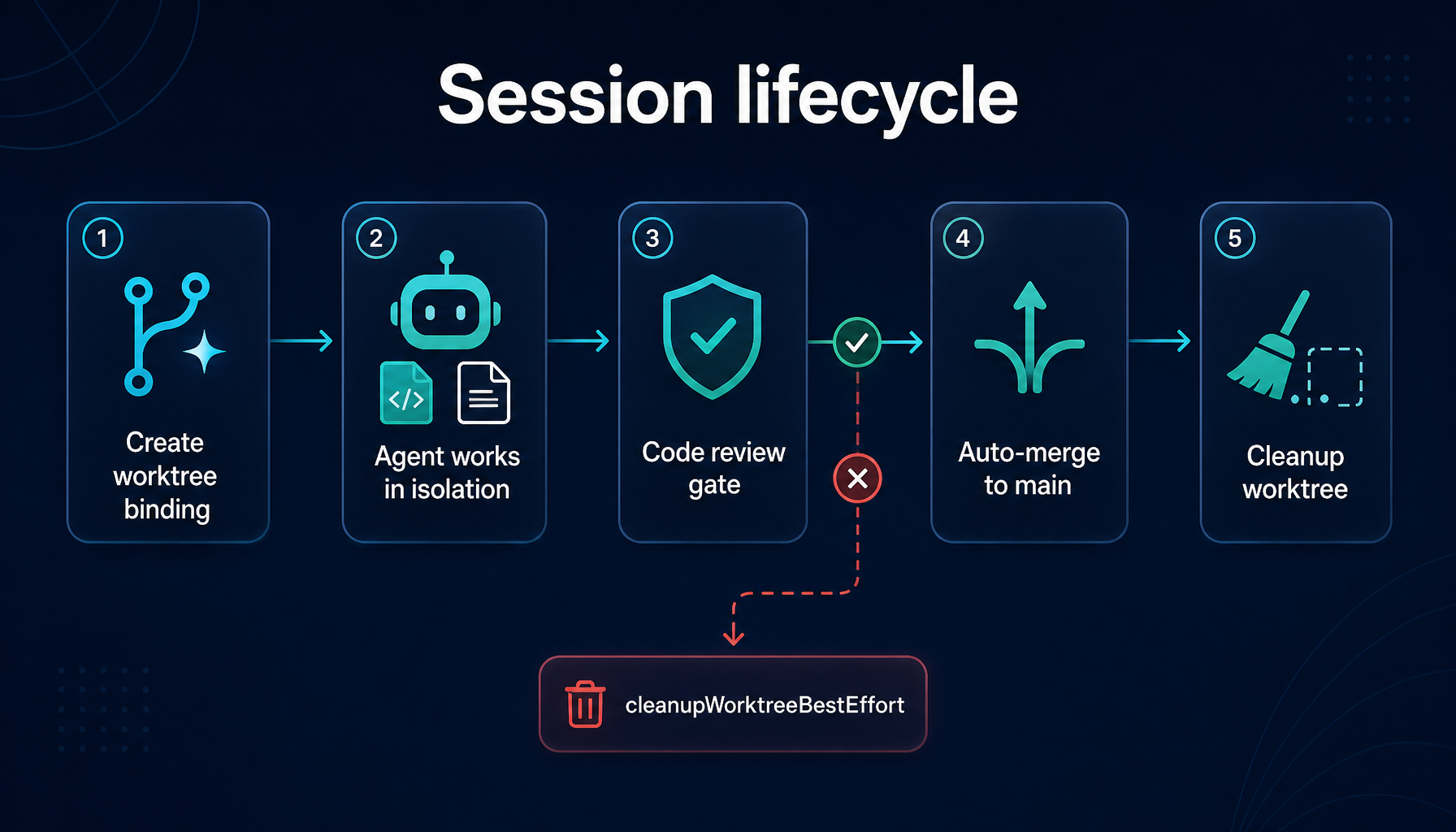
Once a binding is in place, every write the agent performs is routed to the worktree path. The original checkout stays untouched.
In practical terms, create_worktree_binding does a few things:
- Walks up from the given path to find the Git repository root (the user's opened repo)
- Reads the current branch — that becomes the merge target
- Generates a branch name from the session ID and a sanitized task description, shaped like
aiagent/{session}/{task}-{hash}, so any future change can be traced back to the session that produced it - Creates the worktree in a dedicated directory outside the repository
- Records the binding —
{project_root} → {worktree_path, branch, base_branch}— in session state
When the session enters finalization, the system runs merge and cleanup in a fixed sequence:
- Stage and commit any uncommitted changes left in the worktree
- Switch back to the base branch and
pull --ff-onlyto pick up remote updates first - Perform a non-fast-forward merge of the worktree branch into base — preserving an explicit merge commit
- Remove the worktree directory
- Delete the temporary branch
That last non-fast-forward merge is deliberate. Branch history stays intact in the git log, and every stretch of agent work shows up as a distinct merge node. Anyone reviewing, auditing, or trying to revert later has a clean boundary to operate on.
After all of that, main has one new merge commit. The session's intermediate state is gone. No half-staged files, no orphan branches, no leftover worktree directories.
5. Cross-repo sessions: one binding per repository
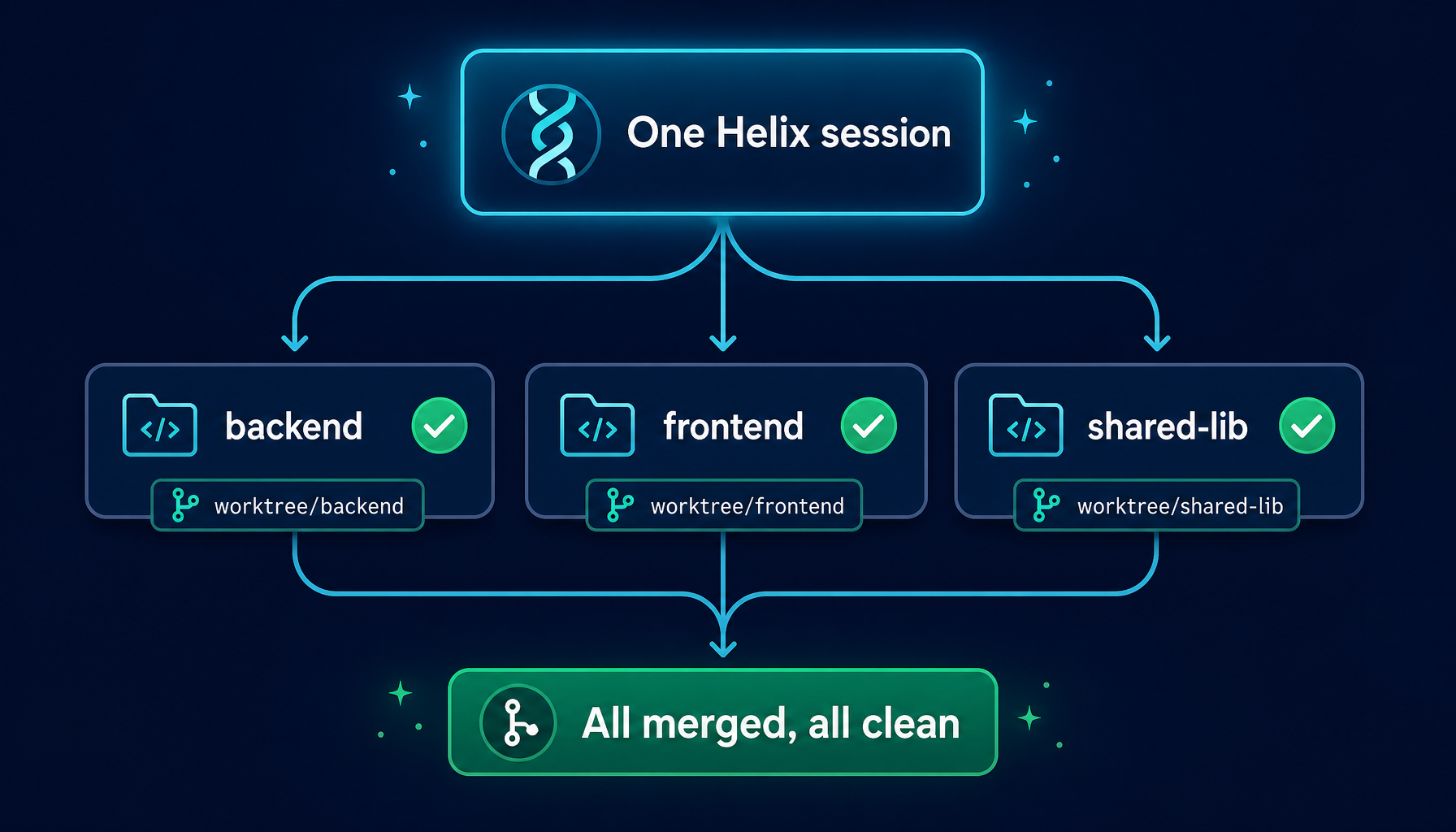
Real engineering tasks rarely fit inside a single repository. A gRPC migration may touch backend, frontend, and a shared library. An analytics event addition may need both an app and a tracking SDK update.
Helix accounts for this at the worktree layer itself: one session can hold multiple worktree bindings — one per repository.
The session state holds a map of project_root → {repo_path, worktree_path, branch, base_branch}. Every repository gets:
- its own isolated branch
- its own worktree directory
- its own base branch (each repo's main might be named differently)
At finalization, the system processes each binding in turn: merge, then clean up. If a particular repository's merge fails, the error is surfaced explicitly and that repository's worktree is preserved for human inspection — but repositories that have already merged successfully are not dragged into the failure.
This is what makes cross-repo tasks actually tractable. A single session can span five repositories without dirtying any of them; at the end, each repository receives its own clean merge commit.
6. Working with Manager Mode: parallel SubAgents inside a shared boundary
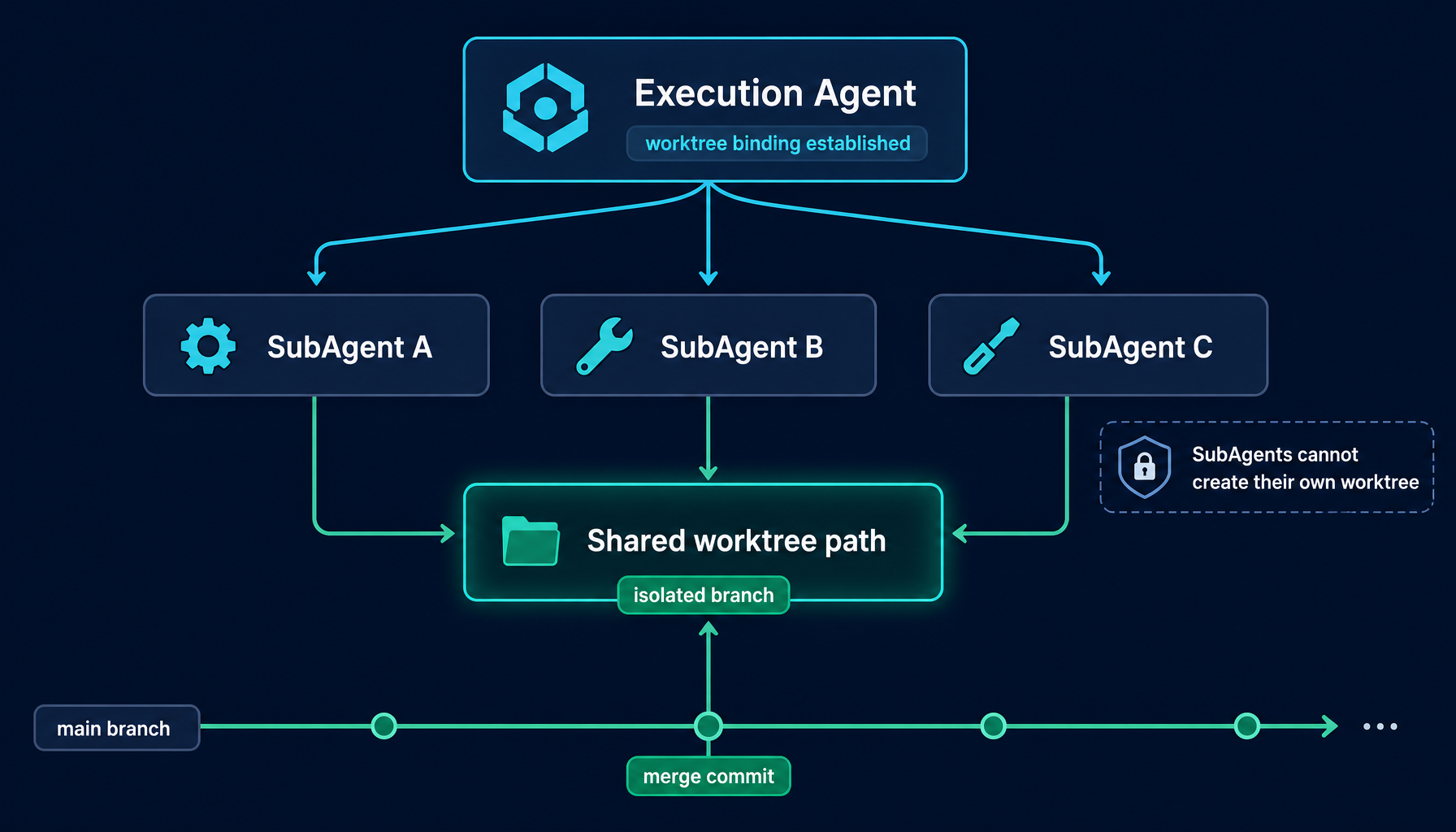
The worktree system becomes significantly more powerful when combined with Manager Mode's parallel SubAgent execution.
In Manager Mode the Execution Agent can dispatch multiple SubAgents to run concurrently. Each SubAgent has its own context, its own tool calls, its own LLM interaction. Without worktree isolation, parallel SubAgents writing to the same repository would collide instantly.
With worktree isolation, the picture is different:
- The worktree is created by the top-level Execution Agent before any SubAgent is dispatched.
- All SubAgents work in the same worktree path — that path is the shared isolation boundary.
- SubAgents cannot create their own worktree bindings.
create_worktree_bindingis filtered out of the SubAgent tool list at the system level. - They inherit the worktree context that was set up before they were dispatched, but they cannot change it.
In other words, no matter how many SubAgents run in parallel — ten, twenty — the Execution Agent remains the single point of coordination for repository state. Manager Mode guards the boundary of intent; Automatic Worktree guards the boundary of physical writes. Together they make "a fleet of agents working in one repository without hurting each other" something the user no longer has to think about.
7. The code review gate: skip review, skip merge
Worktree finalization — merge plus cleanup — is gated on a passing code review. The session cannot complete and merge until that gate flips green.
This is not a prompt instruction asking the agent to review its work. It is a state machine check inside the session: a "review passed" flag must be set, or the finalize call refuses to proceed. The merge does not happen.
In practice, the workflow is forced into this exact order:
- The agent decides it is done with the task
- A code review is triggered
- Review passes → the flag is set; review fails → the session continues working
- Changes are summarized
- The worktree branch is merged to main
Skipping the review is not a way to merge faster. Skipping review means skipping merge, period. The two are tied together at the system level. If you want to bypass review, you have to give up the merge — and the worktree stays quietly in its isolated directory waiting for human attention.
This turns "review before merge" from a good practice into a path the agent cannot work around.
8. Failure and cleanup: an explicit destructive boundary
Worktree creation and merge can both partially fail — directory exists but branch creation didn't, or the session is interrupted before finalize runs. Helix splits these into two clearly separated paths:
Explicit failure during finalize. The error is surfaced as-is, the session is not marked complete, and the worktree and branch both stay intact. The user can inspect the state, fix things manually, and retry. This is the "nothing is broken, it just hasn't merged yet" path.
Abandoning without merge. When a session is being given up — task cancelled, error makes the changes unwanted — the system invokes an explicit "best-effort cleanup": remove the worktree directory, and force-delete the unmerged branch.
The force-delete is intentional. The normal git branch -d refuses to delete an unmerged branch, which is a protection in regular development. On the "discard agent work-in-progress" path, that protection becomes an obstacle. So Helix opts in to destructive deletion only on this specific path.
This path is explicit about what it is: it represents discarded work.
With both paths clearly separated, user expectations become predictable. Merge failure leaves things intact and recoverable. Abandonment leaves the repository clean and free of residue. The two never cross-contaminate.
9. Why automatic beats opt-in
The case for opt-in worktree is "give users control" — skip the worktree overhead on small tasks.
Turn that around: "small tasks" are exactly where most accidental main-branch pollution starts.
The task looked small. The user did not bother to set up worktree. The agent did nine things the user expected and one thing the user did not. Now the user is untangling a mixed-up working copy with no clean boundary to revert.
Helix's position is that the overhead of worktree isolation is now low enough — creating a worktree is a fast git operation, cleanup is automatic, branch naming is automatic — that the tradeoff is worth making unconditionally. The constraint removes an entire category of repository-state problems from the user's mental load.
You don't enable worktree isolation. You don't remember which tasks to enable it for. It's simply how Helix works.
10. What users actually get
Translated into day-to-day experience, Helix's Automatic Worktree system means:
- Main is never dirty from agent work. In-progress tasks always live in isolated branches and separate directories.
- Parallel sessions don't interfere. Each session has its own worktree and its own branch. Five concurrent sessions, five completely independent working copies.
- Merge stops being a manual step. When a task completes and clears review, the change lands on main as a proper merge commit.
- History is clean and traceable. Every agent-driven change appears as a distinct merge commit. Branch names encode session ID and task description — any change traces back to the session that produced it.
- Rollback is unambiguous. If a session produced changes you don't want, the merge commit itself is a clean revert target. No need to untangle half-finished file edits.
- Cross-repo tasks are a first-class citizen. One session gracefully handles changes across multiple repositories, each receiving its own clean merge commit.
11. How to use it
Worktree isolation is enabled by default in every Helix session. There is nothing to configure.
Open a session, run a task that writes to a repository, and the agent will set up the worktree before writing; when the task completes, merge and cleanup happen automatically. From the user's perspective, the experience is just "tell an AI coworker what to do, watch the result land on main" — every isolation step in between is invisible.
If you want to observe the behavior directly:
- Open a Helix session in a workspace with a git repository
- Run any task that writes to repository files
- While it runs, peek at
~/.aiagent/worktree/— you'll see the isolated working copy - When the task completes, the worktree is gone and the changes are on main as a merge commit
For complex tasks that span multiple repositories or need parallel execution, combine Automatic Worktree with Manager Mode to get the full benefit of multiple SubAgents working safely inside one isolation boundary.
12. What's coming
A few worktree workflow improvements are in flight:
- Worktree inspection UI — view active worktrees, their branches, and pending changes directly from the session panel, without dropping to a terminal.
- Selective merge — approve or reject individual commits from a session before they land on main.
- Cross-session worktree sharing — let related sessions share a worktree boundary for coordinated multi-session work.
- Conflict resolution tooling — a better UI for cases where automatic merge fails and human intervention is required.
One core principle is not going to change:
Agents work on isolated branches. Main only receives deliberate, reviewed merges.
This is one of the inevitable consequences of designing agents as an engineering system rather than as a chat box. Together with Manager Mode's goal-keeping and HelixVM's execution boundary, Automatic Worktree forms Helix's answer to a deceptively simple question: when an agent is genuinely doing the work for you, who is keeping its boundaries?