Automatic Worktree:让 Agent 不再在你的 main 分支上裸奔

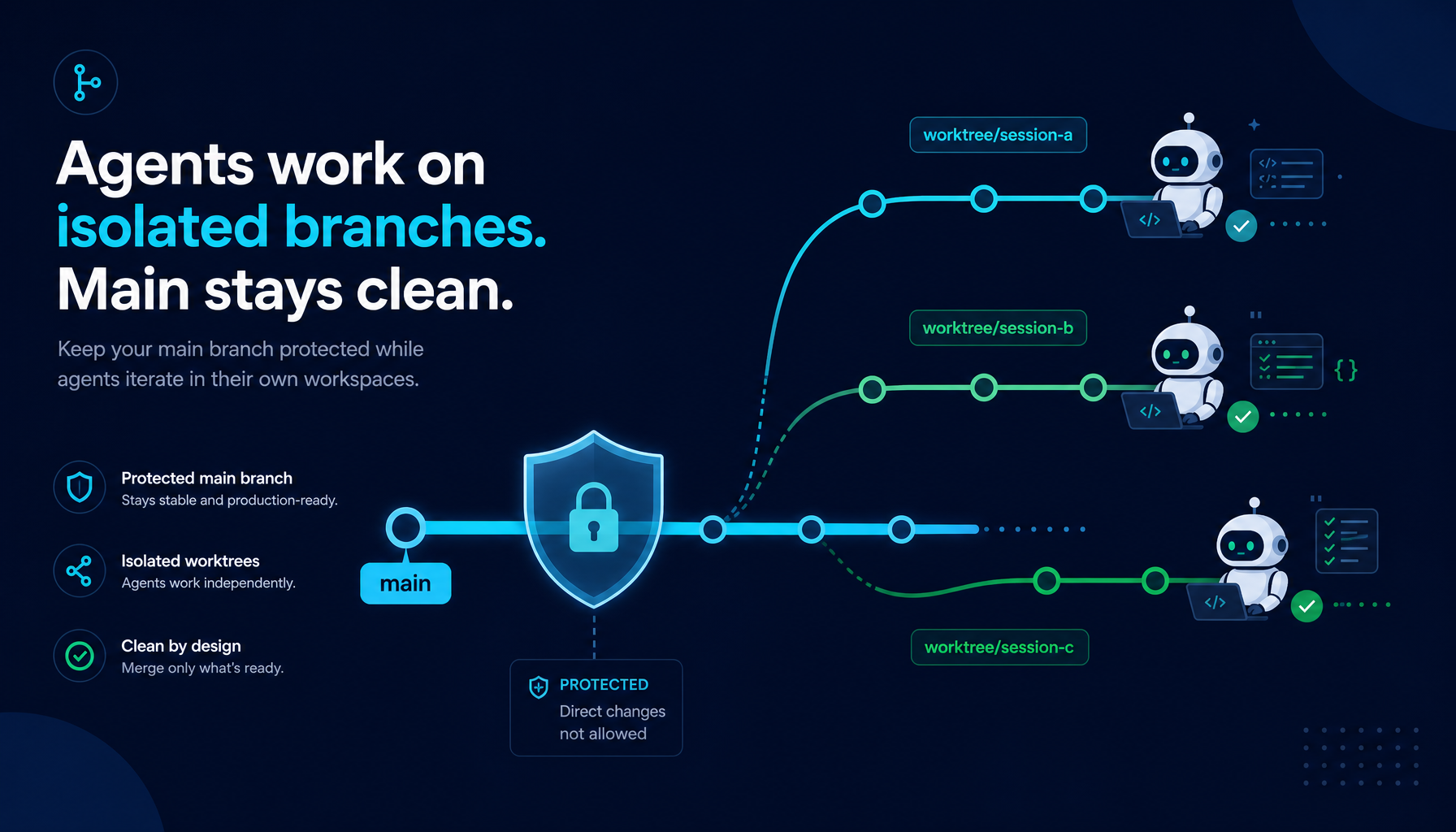
任何编码 Agent 最终都要往你的仓库里写代码。
问题是:它写到哪个分支?
大多数 AI 编码工具把这个问题甩给了用户。Helix 在 Agent 触碰任何一个文件之前,就在系统层面给出回答。
这是 Helix 多 Agent 架构 的第三条边界 —— 在 Manager Mode 守住「目标范围」、HelixVM 守住「主机边界」之外,Automatic Worktree 守住的是仓库分支的边界。
1. 直接写 main:Agent 演示里没人提的那些事
当 AI Agent 编辑文件时,它需要把改动放在某个地方。阻力最小的路径,就是用户当前打开的工作目录 —— 通常正是 main 分支本身。
这就引出一类大家在 Agent 演示里很少提的问题:
- 任务半途死掉,main 就脏了。 Agent 开始一个重构,改了三个文件,遇到错误就停了。
git status一片狼藉,用户也搞不清哪些可以放心提交、哪些应该回滚。 - 并发任务互相打架。 同时跑多个 Agent 或多个会话,它们都在写同一份 checkout。文件冲突难以预测,也难以调试 —— 出了问题,你甚至不知道是哪个会话写脏的。
- 回滚极其痛苦。 Agent 改了你不想要的东西,但同时也改了你想要的东西。两者纠缠在同一份工作副本里,想 revert 都没有干净的边界。
- 没有「合并前评审」这件事。 代码已经在 main 上了 —— review 变成了事后追认,而不是事前关卡。
worktree 问题并不是 AI Agent 才有的。它是任何并行开发流程都会遇到的老问题。Git 自己给出的答案就是 worktree:仓库的另一份 checkout,处在另一个分支、另一个目录,改动在被显式合并之前都是隔离的。
真正的问题是:谁来创建并管理这个 worktree?
2. 其他工具的答案:opt-in worktree + 手动合并
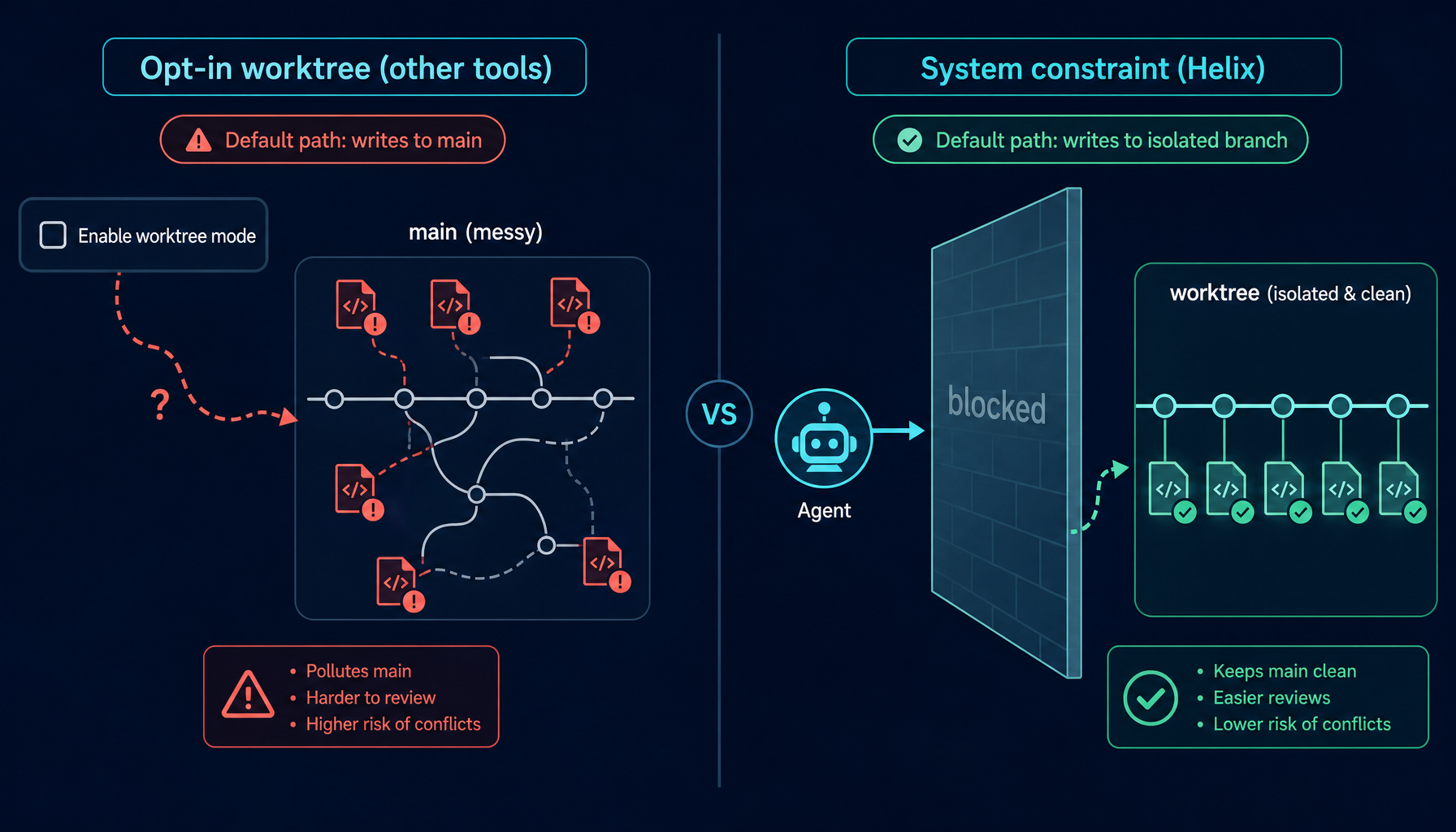
业内一些编码 Agent 工具已经加了 worktree 支持。模式大同小异:
用户:打开 worktree 模式
工具:好,worktree 已启用
用户:开始任务
工具:创建 worktree……完成
用户:审查输出
用户:手动合并分支   ← 手动一步
这条路径里有两个关键问题:
worktree 是可选的。 你得知道有这个东西,并主动打开它。如果忘了 —— 或者只是想跑一个小活,觉得不值得为此费心 —— Agent 还是会直接写进你当前的工作副本。
合并永远是手动的。 工具帮你建 worktree、帮 Agent 干活,但要把改动带回 main 是用户自己的事。一个任务可以接受,五个并发任务、每天十几次 Agent 协作的工作流里,这种手动开销就会迅速堆积成新的负担。
方向是对的。但「opt-in worktree + 手动合并」意味着:默认路径 —— 也就是不去配置、不假思索跑一个小任务的那条路径 —— 仍然把 main 暴露在外。
而绝大多数事故,正是从「我就跑个小活,不用 worktree 吧」开始的。
3. Helix 的做法:把 worktree 做成系统约束
在 Helix 中,worktree 隔离不是一个用户可以「启用」的功能,而是 Agent 与仓库交互方式中的一项架构约束。规则在系统层面强制执行,而不是写在 prompt 里靠 Agent 自觉。
Helix 在 worktree 上立了三条硬规则:
-
没有 worktree 绑定,Agent 就不能写。 无论是 Execution Agent 还是 SubAgent,在还没有为某个仓库建立 worktree 绑定之前,系统都会拒绝对当前分支上受 git 管理文件的写入。这不是「会被警告」,而是「直接写不进去」。
-
绑定由 Agent 主动声明,不需要用户配置。 当 Agent 判断当前任务需要改某个仓库的代码时,它会先调用一次
create_worktree_binding。系统创建 worktree、生成一个隔离分支、把路径交还给 Agent,这一切发生在 Agent 动任何一个文件之前。 -
合并是自动的。 当会话完成、Code Review 通过、改动提交之后,系统会自动把 worktree 分支合并回 base 分支,移除 worktree,删除临时分支。用户不需要操心这一切。
整条流程对用户来说大致是这样:
Agent:我需要写 /projects/my-repo
Agent:create_worktree_binding(project="/projects/my-repo", task="add auth middleware")
系统:已创建 worktree
      分支:aiagent/{session}/add-auth-middleware-a3f7c91d
      base:main
Agent:[在 worktree 里完成全部工作]
Agent:[任务完成,Code Review 通过]
系统:stage → commit → 切回 main → 拉取最新 → 非快进合并 → 移除 worktree → 删除临时分支
整个过程 Agent 从来没有访问过 main。任务进行中 main 一刻也不会变脏。合并完成时,用户拿到的是一次干净的合并提交。
隔离不是一个开关,而是系统的默认形状。
4. 会话生命周期:从绑定到清理
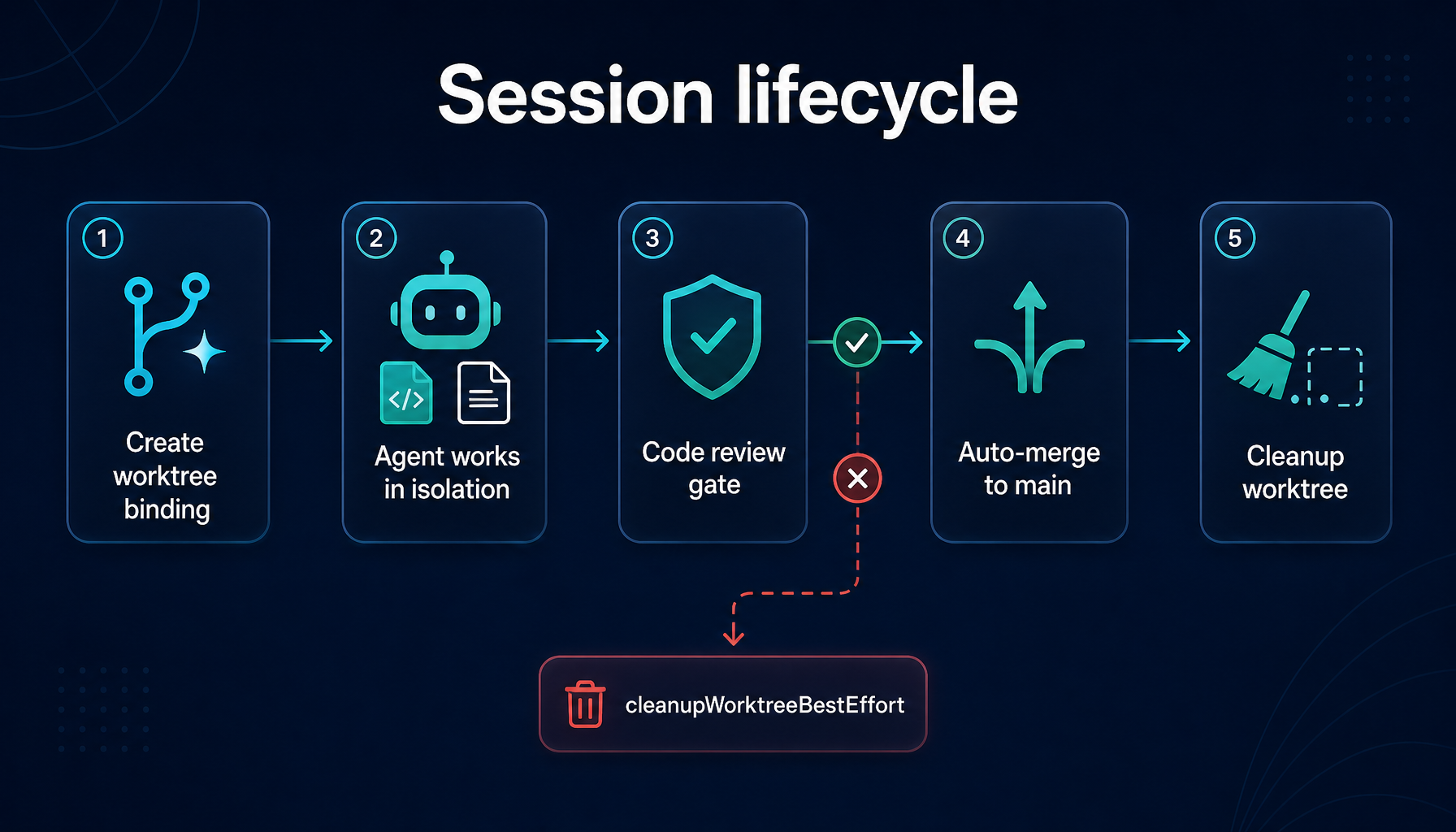
绑定建立之后,每一次写入都会被系统路由到 worktree 的路径下,原始 checkout 保持完全不动。
具体来说,create_worktree_binding 会做几件事:
- 从给定路径向上回溯,找到 Git 仓库根(即用户当前打开的仓库)
- 读取当前分支,作为后续合并的目标
- 根据会话 ID 和任务描述生成分支名,形如
aiagent/{session}/{task}-{hash}—— 让任何一处改动都能溯源回产生它的会话 - 在仓库之外的专用目录里建好 worktree
- 在会话状态里登记一份「项目根 → worktree 路径、分支、base 分支」的映射
会话进入收尾阶段时,系统会按一个固定的次序处理合并和清理:
- 把 worktree 里所有未提交的改动 stage 并 commit
- 切回 base 分支,先
pull --ff-only把远端的新提交拉下来 - 用非快进合并把 worktree 分支并入 base —— 这一步会保留一个独立的 merge commit
- 移除 worktree 目录
- 删除临时分支
最后那一次非快进合并是有意为之:分支历史会被完整保留在 git log 里,每一段 Agent 工作都呈现为一次独立的合并节点。事后想 revert、想审计、想看「Agent 那次到底改了什么」,都有清晰的边界。
整段时间里,用户的 main 拿到的是一次合并提交;会话留下的中间状态全部消失。没有半成品文件,没有遗留分支,没有 worktree 目录残留。
5. 跨多仓库的会话:每个仓库一份独立绑定
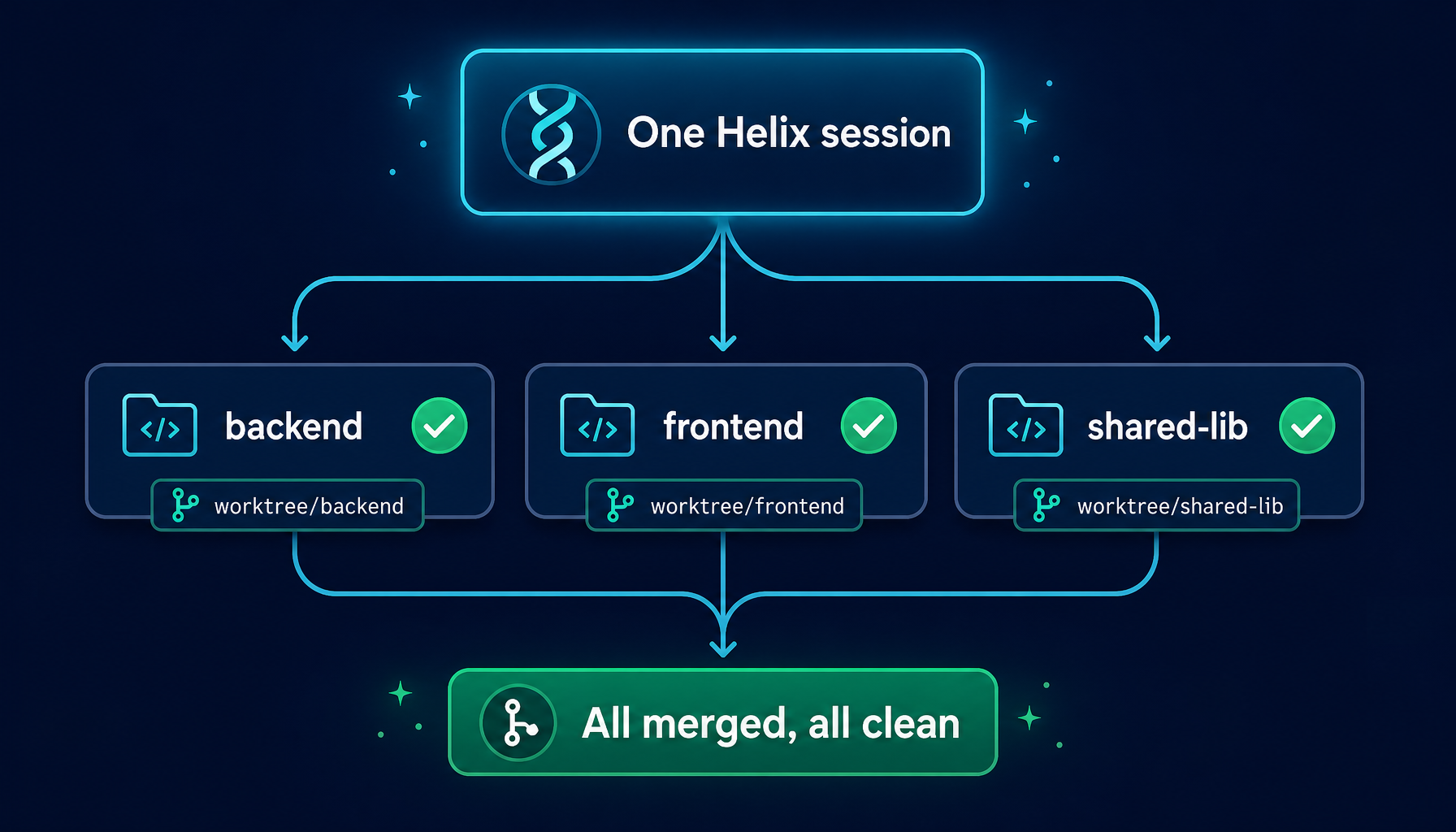
真实工程任务很少局限在一个仓库里。一次 gRPC 改造可能同时牵涉 backend、frontend、共享库三个仓库。一次行为埋点的变更可能要改业务代码也要改 SDK。
Helix 在 worktree 这一层就考虑了这一点:一个会话可以同时拥有多个 worktree 绑定,每个仓库一份。
会话状态里保存的是一份「项目根 → 仓库信息」的映射。每个仓库都有:
- 它自己的隔离分支
- 它自己的 worktree 目录
- 它自己的 base 分支(每个仓库的主分支命名可能都不一样)
会话完成时,系统按顺序处理每一个绑定:依次合并、依次清理。任何一个仓库合并失败,错误会被显式抛出,那个仓库的 worktree 会被保留下来以便人工介入 —— 但已经成功合并的仓库不会被这一次失败牵连。
这一点让跨仓库任务变得真正可用。一个会话可以同时跨五个仓库工作,期间没有任何一个仓库变脏;会话结束时,五个仓库各自拿到一次干净的合并提交。
6. 与 Manager Mode 协同:并行 SubAgent 共享一个安全边界
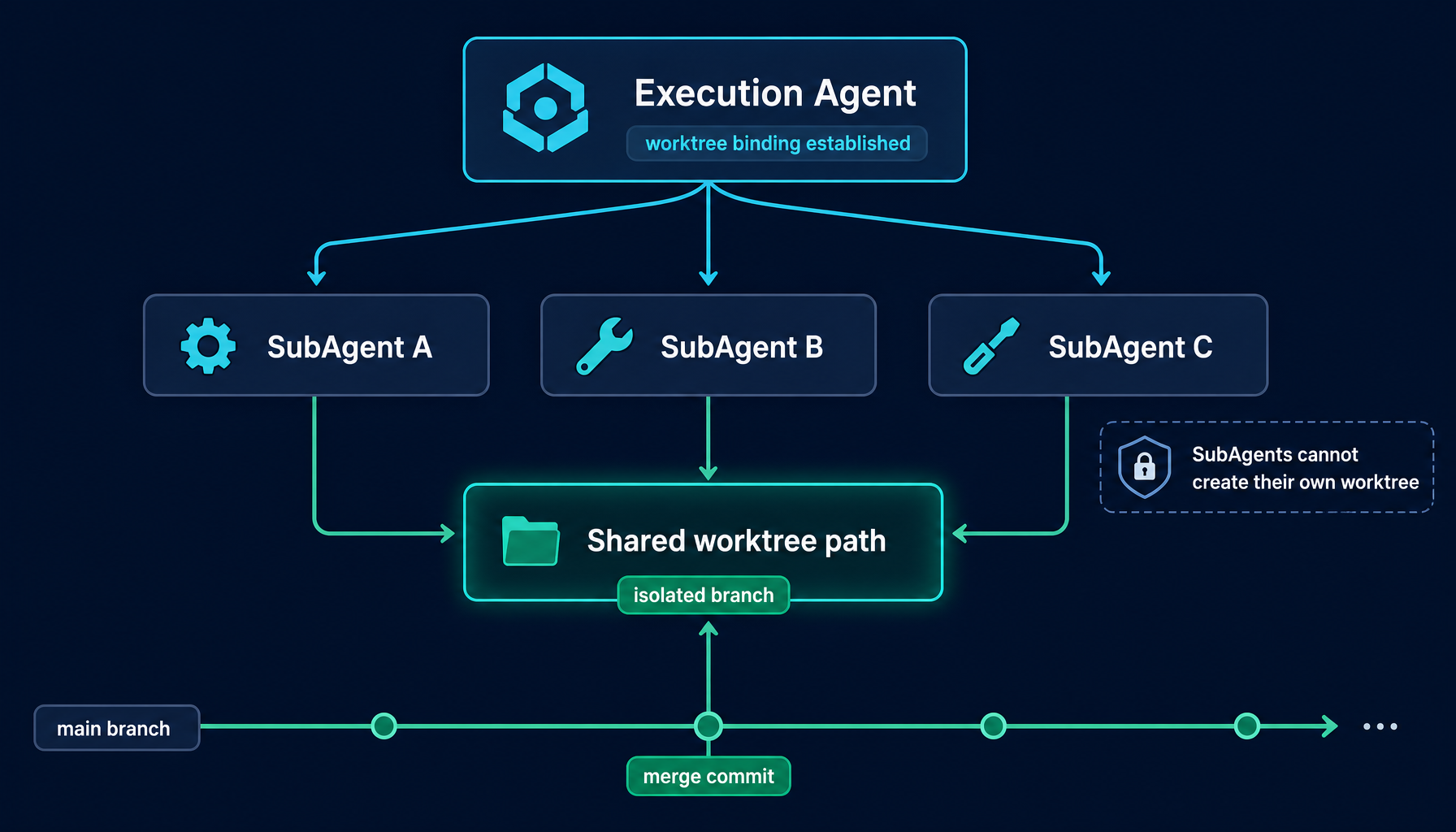
Worktree 系统在和 Manager Mode 的并行 SubAgent 执行结合起来之后,威力会显著放大。
在 Manager Mode 下,Execution Agent 可以并发派发多个 SubAgent。每个 SubAgent 是独立的上下文,有独立的工具调用、独立的 LLM 交互、独立的工作目标。如果没有 worktree 隔离,多个并行 SubAgent 同时写同一个仓库会立刻冲突。
有了 worktree 隔离,事情变得不一样了:
- worktree 由最上层的 Execution Agent 在派发 SubAgent 之前建立好
- 所有 SubAgent 在同一个 worktree 路径下工作 —— 这个路径就是它们共享的隔离边界
- SubAgent 自己不能创建新的 worktree 绑定 ——
create_worktree_binding这个工具在系统层面就被从 SubAgent 的工具列表中过滤掉了 - 它们继承 Execution Agent 已经建立好的 worktree 上下文,但无权改变它
换句话说,无论并行跑十个还是二十个 SubAgent,仓库状态的唯一协调点始终是 Execution Agent。Manager Mode 在「目标范围」上守住边界,Automatic Worktree 在「物理写入」上守住边界。两者叠加之后,「让一群 Agent 在一个仓库里并发工作而不互相伤害」这件事,第一次变得不需要用户去操心。
7. Code Review 闸门:跳过 review,就跳过合并
worktree 的收尾 —— 合并加清理 —— 受 Code Review 的强制约束。会话不能完成并合并,除非 review 已通过。
这不是写在 prompt 里、靠 Agent「记得自我审查」的提示语。它是一个状态机检查:会话内部维护一个「review 是否通过」的标志位,没有置位的话,finalize 调用会直接拒绝执行,合并不会发生。
实际工作流被强制成这个顺序:
- Agent 判断自己已经完成任务
- 触发 Code Review
- Review 通过后,标志位被置位;review 不通过,会话需要继续改
- 总结改动
- 合并 worktree 分支到 main
跳过 Code Review 就意味着同时跳过合并。两者在系统层面是绑定在一起的 —— 你想绕过 review,就只能放弃合并。worktree 仍然安静地待在隔离目录里,等待人工处理。
这一条把「合并前评审」从一个良好实践,变成了一条 Agent 没法回避的路径。
8. 失败与清理:明确的破坏性边界
worktree 的创建和合并都可能部分失败 —— 比如目录已经存在但分支创建失败,或者会话在 finalize 之前被异常打断。Helix 用两种明确分开的方式处理这些情况:
收尾阶段显式失败: 错误会被原样暴露出来,会话不会被标记为完成。worktree 和分支都被保留 —— 用户可以查看现场、手动修复、再触发一次合并。这是「东西没坏,只是没合上」的路径。
未合并即丢弃: 当一个会话需要被放弃 —— 比如任务被用户取消、或者中途的错误让所有改动都不再需要 —— 系统会调用一个明确的「best-effort 清理」流程:直接移除 worktree 目录、强制删除还没合并的分支。
之所以是强制删除而不是普通删除,是因为这条清理路径本来就是处理未合并工作的。普通的 git branch -d 会拒绝删除一个未合并的分支,这在正常开发流程里是个保护机制 —— 而在「丢弃 Agent 半成品」这条路径上,它会反过来挡住清理。所以 Helix 在这一路径上明确选择了破坏性删除。
这条路径明确地承认了一件事:它代表的是被丢弃的工作。
边界清晰之后,用户的预期就稳定了:合并失败时东西还在、可以手动处理;放弃任务时东西干干净净没了,不留残留。两条路径不会互相干扰。
9. 为什么自动化优于 opt-in
支持 opt-in worktree 的理由通常是「把控制权留给用户」。用户可以在跑小任务时省去 worktree 的创建和清理开销。
反过来想这一点:「小任务」恰恰是绝大多数意外污染 main 的起点。
任务看起来很小,用户没有去配置 worktree。Agent 做了九件预期之内的事,外加一件没预期的事。然后用户就开始处理一份混杂的工作副本 —— 不知道哪些是想要的、哪些不是,回滚的时候找不到干净的边界。
Helix 的立场是:worktree 隔离的开销已经足够低 —— 创建一个 worktree 是 git 自身就支持的轻量操作,清理是自动的,分支命名是自动的 —— 这种取舍值得无条件做出。这一条约束,把「仓库状态管理」这一整类问题,从用户每天需要操心的事项里彻底移走了。
用户不需要去打开 worktree 隔离,也不需要记得在哪些任务上打开它。它就是 Helix 的工作方式。
10. 用户实际拿到的是什么
落到使用层面,Helix 的 Automatic Worktree 系统带来的体验是:
- main 永远不会被 Agent 工作弄脏。 进行中的任务一直待在隔离分支和独立目录里。
- 并行会话不会互相干扰。 每个会话有自己的 worktree、自己的分支。五个并发会话,五份完全干净的工作副本。
- 合并不再是一道手动工序。 任务完成并通过 review 之后,改动会以一次规范的合并提交自动落到 main。
- 历史干净、可追溯。 每一处 Agent 驱动的改动都呈现为一次独立的合并提交。分支名编码了会话 ID 和任务描述 —— 任何一段改动都能溯源回产生它的会话。
- 回滚清晰。 如果某个会话最后产出了不想要的改动,那次合并提交本身就是一个干净的 revert 目标。不必再去拆解半成品的文件改动。
- 跨仓库任务是一等公民。 一个会话能同时优雅地处理多个仓库的改动,每个仓库都拿到自己干净的合并提交。
11. 怎么用上它
worktree 隔离在每一个 Helix 会话里默认启用,不需要任何配置。
打开一个会话、跑一个会写入仓库的任务,Agent 在写入之前会自动处理 worktree 创建;任务完成时,合并和清理自动发生。用户的体验就是「跟一个 AI 同事说要做什么、看到结果落进 main」,中间所有隔离工作对用户完全透明。
想要直接观察这一行为:
- 在一个带 git 仓库的工作区里打开 Helix 会话
- 让 Agent 跑一个会修改仓库文件的任务
- 任务执行期间,查看
~/.aiagent/worktree/—— 你会看到隔离的工作副本 - 任务完成后,worktree 已经消失,改动以合并提交的形式落在了 main 上
对于跨多个仓库或者需要并行的复杂任务,把 Automatic Worktree 和 Manager Mode 搭配使用,可以让多个并行 SubAgent 在同一条隔离边界内安全协作,发挥全部能力。
12. 接下来的计划
Helix 在 worktree 工作流上还有几件正在打磨的事:
- Worktree 检视 UI:直接从会话面板查看活跃 worktree、它们的分支以及待处理改动,不必再开终端去看
~/.aiagent/worktree/。 - Selective merge:在改动落到 main 之前,对会话中的单个 commit 逐一批准或拒绝。
- 跨会话 worktree 共享:让相关会话共享同一个 worktree 边界,进行协调一致的多会话协作。
- 冲突解决工具:为那些自动合并失败、确实需要人工介入的情况提供更友好的 UI。
但有一条核心原则不会变:
Agent 在隔离分支上工作。main 只接收经过审慎评审的、规范的合并。
这是 Helix 把 Agent 当作工程系统、而不是当作聊天框来设计的必然结论之一。和 Manager Mode 的目标守护、HelixVM 的执行边界 一起,它们共同构成了 Helix 对一个核心问题的回答:当 Agent 真的开始替你干活的时候,谁来守住它的边界?
想试试看?
- 🚀 启动 Web 版
- 💾 下载桌面端
- 📖 快速上手文档
- 🧩 深入了解 Manager Mode
- 🔒 深入了解 HelixVM 安全沙箱
- 🌿 回到 Helix 总览